What Makes a Good Security Camera System for a House?
A good security camera system covers the places you need to watch, records in a way you can review, and fits your power, network and storage needs. Choose wired cameras for steady power and continuous recording, or wire-free cameras when placement flexibility matters more.
On this page (10 sections)
- What makes a good security camera system?
- How should you choose camera coverage?
- Should you choose wired, wireless, battery or solar cameras?
- Does the system need a recorder or local storage?
- What should you know about alerts and subscriptions?
- Which security camera system fits your home?
- How do you compare two camera systems?
- How do you set up and care for a camera system?
- What mistakes should you avoid when choosing a system?
- What is a good security camera system for your house?
A good security camera system for a house covers the areas you care about, records footage you can review, and fits your power and network setup. If you're asking what is a good security camera system for your home, start with your camera locations and recording needs, then choose a kit that supports them.
Mark the paths people use to reach your home, such as doors, gates, a driveway or a side yard. Then decide how you want to power cameras, store footage and review events.
A camera count alone doesn't guarantee useful coverage. Our home security camera system guide explains how to match a kit to your home's layout.
What makes a good security camera system?
A good system gives you useful views, recordings you can find, and alerts that fit your needs. The right choice depends on where cameras will go and how you want to power and review them.
Use these questions to compare kits:
| What to check | Why it matters |
|---|---|
| Coverage | Cameras need a clear view of the places you want to monitor. |
| Power and wiring | Fixed wired cameras and battery or solar cameras suit different locations. |
| Recording | Continuous and event-based recording capture footage in different ways. |
| Storage | Local recorders, local hubs and cloud plans affect how you save and review clips. |
| Alerts | Person, animal or vehicle detection can make notifications more specific. |
| Remote access | Check what you can view or play back from your phone and whether it needs internet access. |
A home can have many cameras and still have blind spots when the positions overlap or point away from likely approaches. Sketch the property and mark entry points and approach paths before comparing kits.
How should you choose camera coverage?
Choose cameras based on the views you need, not a target number. Cover the places where someone approaches or enters, and avoid aiming cameras where walls, eaves or landscaping block the view.
Walk the property and note the front and back doors, driveway, side paths and detached buildings. Decide what each camera should show, such as a person approaching a door or a vehicle entering the driveway.
Check each camera's field of view and mounting position before installing it. A wide view can cover more area, but distant details may be harder to see; our guide to home security camera resolution explains how resolution affects detail.
For a larger home with several fixed positions, a recorder kit can manage multiple cameras together. The best NVR camera systems for a whole house guide compares that type of setup.
Should you choose wired, wireless, battery or solar cameras?
Choose the power method that works at each camera location. Wired cameras suit places where you can run cable, while battery or solar cameras help when wiring is difficult.
PoE cameras use one network cable for power and video when connected to a compatible recorder. This can reduce separate power connections at each camera.
You still need a route for the cable. Read how to wire security cameras at home before planning an installation.
Wire-free cameras offer more placement choices, but check whether they use batteries, solar panels or another power source. Solar performance varies with sunlight, season, placement and settings, so a shaded camera location may need another plan.
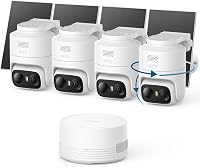
The aosu kit suits locations where a separate solar panel can receive sunlight. Its cameras connect to the aosuBase over a dedicated wireless link, while the base connects to your router by Ethernet.
For a battery system, plan how you'll recharge or swap batteries and check what recording features work between charges. The best battery security camera systems guide focuses on those trade-offs.
Does the system need a recorder or local storage?
A recorder or local storage hub keeps footage at home for later review. Choose a system based on how you want to record and retrieve clips, not only its camera count.
An NVR works with compatible network cameras, while a DVR commonly records from wired analog cameras. Kits may include a recorder and drive, a hub with memory, or cameras that rely on cloud storage; compare the complete setup before buying.
See how a home security camera system works for an overview.
The Reolink PoE kit includes six cameras, an 8-channel NVR and a 2TB hard drive. It supports 24/7 recording, person and vehicle detection, and ambient sound capture through the cameras' built-in microphones.
Pet detection is supported after a firmware update.
The ANNKE kit includes eight 1080p cameras, an 8-channel DVR and a preinstalled 1TB hard drive for continuous recording. It supports human and vehicle detection.
If you're comparing drive capacity and retention, read how long security camera footage lasts. Recording quality, camera count and activity all affect how much footage fits.
What should you know about alerts and subscriptions?
Check which alerts work without a paid plan and how detection works. A useful alert setup fits the activity you care about, while too many notifications can make important events harder to spot.
Person, animal and vehicle detection can help distinguish types of activity from general motion. Performance depends on placement, distance, lighting and settings, so adjust detection areas and alerts after installation.
Some systems store video locally. Others offer cloud history and advanced detection through a subscription.
Arlo includes a one-month trial of its Secure plan, which offers 60-day video history and advanced features.
After the trial, Arlo requires a paid plan for those features. Live streaming and basic alerts work without a subscription.
Before choosing a cloud plan, confirm how long clips remain available and what happens when the plan ends. Our cloud vs local storage guide explains the trade-offs.
Which security camera system fits your home?
The right system depends on your wiring options, camera locations and recording priorities. These four kits suit distinct needs, so eliminate any that don't match your installation or storage preferences.
Reolink suits fixed coverage and continuous recording
The Reolink kit suits a home where you can route network cable to fixed outdoor camera positions. Its six PoE cameras connect to an 8-channel NVR with a 2TB hard drive.
Its cameras capture ambient sound, and the system supports continuous recording, person and vehicle detection, and pet detection after a firmware update. Choose this style if a cable route is practical and a recorder-based setup meets your needs.
If you want cameras to move across a wide yard, compare a fixed view with a PTZ camera system.
aosu suits sunny spots and event recording
The aosu kit suits outdoor areas where cameras need wire-free placement and the solar panels can get sunlight. Its base includes 32GB of local storage, expandable up to 1TB with a separately sold microSD card.
It records events rather than continuously, which can reduce inactive footage to review. The cameras connect to the base wirelessly, and the base connects to the router by Ethernet.
Choose it if flexible placement and local storage matter more to you than a continuous timeline. For more on this setup, see solar powered security camera systems.
ANNKE suits a wired DVR setup
The ANNKE kit suits a home that needs several wired cameras and a DVR with a preinstalled drive. It includes eight 1080p cameras and supports continuous recording to its 1TB hard drive.
ANNKE says its DVR can work without internet, though remote access and playback require it. Choose this kit if a wired DVR matches your camera setup and you prefer local recording.
Compare recorder types in our NVR vs DVR guide.
Arlo suits places where cable runs are impractical
The Arlo kit suits entry points or outdoor areas where running power or data cables is impractical. It includes four battery-powered cameras with 2K HDR video, motion alerts and a 160-degree field of view.
Arlo includes color night vision, a spotlight, two-way audio and a rechargeable, swappable battery. Advanced cloud features require a paid plan after the trial, so choose it if you value flexible placement and app-based viewing and are comfortable with that plan.
For a wider range of self-install options, see our best DIY security camera systems.
How do you compare two camera systems?
Compare the complete setup you'll use at home, including power, recording, storage and remote access. Two systems with similar camera counts may handle footage and installation very differently.
Use this checklist before buying:
- Map the views: Mark the doors, paths and outdoor areas you want to cover.
- Confirm power: Identify cable routes, outlets, battery access or useful sunlight.
- Choose recording: Decide whether you need continuous video or event clips.
- Compare storage: Note the included drive or hub storage, expansion options and cloud plan.
- Review alerts: Check available detection types and which features require a subscription.
- Plan access: Confirm what you can view locally and remotely.
- Check privacy controls: Look for activity zones or privacy masks.
For cable length planning, read how far you can run PoE cameras. Also check where cameras point and whether the system lets you mask areas you don't want recorded.
How do you set up and care for a camera system?
A good setup starts with a camera map and a plan for power and storage. Test each view and alert from its intended position before securing every mount, then review recordings to catch missed areas.
For a wired kit, place the recorder where you can reach it and connect it to a display if the setup calls for one. Measure cable routes before drilling, leave enough slack for mounting, and keep connections protected from weather.
For wireless cameras, test the signal at each planned location and confirm the hub or router can reach it. With solar cameras, position the panel where it gets useful sunlight, and leave access for cleaning or adjustment.
Set detection zones to focus on the approach or entry point you care about. Start with alerts that matter, then tune them if passing traffic, changing shadows or other routine motion creates interruptions.
Keep lenses and solar panels free of dust, leaves and cobwebs. Check battery levels, recording status, available storage and camera alignment on a regular schedule, especially after severe weather or yard work.
Avoid pointing cameras into neighbors' private spaces or recording areas where household members expect privacy. Use available privacy masks and tell household members how the system records and who can access the app.
What mistakes should you avoid when choosing a system?
The most common buying mistakes are choosing by camera count, overlooking recording requirements and assuming every feature works without a subscription. Check the entire installation and ownership plan before you buy.
A camera count is only useful when the cameras can see the places you need covered. Don't buy a large kit before mapping the views, since a poor angle can leave a key approach hidden.
Don't assume wireless cameras are completely cable-free or record continuously. Check how each camera gets power, whether it needs a hub, and whether it records events or a full timeline.
Don't treat resolution as a substitute for placement. A high-resolution view pointed at a wall or far across a dark yard may be less useful than a well-placed camera aimed at an entry point.
Don't overlook storage limits and plan requirements. Confirm the included capacity, expansion options, recording mode and which app features remain available without a paid plan.
Finally, don't drill or mount everything before checking live views, night visibility and connection strength. A short placement check can help reveal glare, obstructions or weak signals while the camera is still easy to move.
What is a good security camera system for your house?
A good security camera system is one you can place well, power reliably and use to find the footage you need. Choose Reolink for fixed PoE cameras and continuous recording, ANNKE for a wired DVR kit, aosu for solar cameras with local event storage, or Arlo for flexible battery placement and optional cloud features.
If your first priority is a full timeline, favor a continuous-recording system with enough local storage. If you can't run cables, choose a battery or solar option that fits the light and charging conditions at each location.
Compare the recorder and camera kits in this category for more options. Before deciding, confirm camera locations, storage needs and any subscription features you plan to use.
Frequently asked questions
What is a good security camera system for a house?
A good home system covers the entry points and outdoor areas you care about, records footage you can review, and sends useful alerts. Match its camera count, power source, recorder or storage plan, and network setup to your property before choosing a kit.
Is a wired or wireless security camera system better?
Wired systems can suit fixed camera locations and continuous recording, while wireless kits can be easier to place where running cables is difficult. Wireless does not always mean cable-free: check how cameras get power, how they connect to the hub or network, and whether recording is continuous or event-based.
Do home security cameras need a subscription?
Not always. Some systems store video locally, while others offer cloud features through a paid plan.
Check what you can do without a subscription, how long recordings remain available, and whether the features you want depend on a trial or ongoing plan.
How many cameras does a house need?
Start with the entry points and outdoor areas you want to monitor, then check whether each camera has a clear view without large blind spots. The right count depends on your layout and camera placement, so plan coverage before choosing a kit by its camera total.
Should a home security camera system record all the time?
Continuous recording can help when you want a fuller timeline, but it needs storage for hours of footage. Event-based recording saves clips when activity is detected and may be easier to review, but it can miss activity that the camera does not detect.