Home Security Camera Systems: How to Pick the Right Kit
The right home security camera system depends on the areas you need to cover, how you want to save footage, and what installation your home allows. Choose a wired recorder kit for continuous local recording, or a solar wireless kit for simpler mounting and event clips.
On this page (10 sections)
- What should a home security camera system include?
- Should you choose a wired or wireless camera system?
- Do you need continuous recording or motion clips?
- How much local or cloud storage do you need?
- Where should you place the cameras?
- Which home security camera system fits your setup?
- How should you set up a home security camera system?
- What mistakes should you avoid when buying a home security camera system?
- What should you check before buying a camera kit?
- Which home security camera system should you choose?
A home security camera system should match the places you need to see, the footage you want to keep, and the installation you can manage. Recorder kits suit fixed camera positions and continuous local recording; solar wireless kits suit flexible placement and event clips.
Start by marking the doors, paths and other areas you want to monitor. Then decide whether you need continuous recording, how long you want to keep clips, and whether running cables is practical.
A four-camera kit can cover several outdoor viewpoints, but only if each camera has a clear view and a reliable power or network connection. An eight-camera kit adds more viewpoints, while a recorder kit can save footage to a central hard drive.
For a focused comparison, see our recorder camera kits guide. If you're starting from scratch, our guide to how a home security camera system works explains the parts and how they fit together.
What should a home security camera system include?
A home camera system needs cameras, a power source, a recording method and a way to view footage. Some kits bundle a base or recorder; others depend on a separate hub, app or storage plan.
Choose the complete setup, not just the camera count. Confirm what comes in the box and what your home needs to supply, including a router connection, power outlet, cable path or compatible base.
| Setup choice | What to check | Often suits |
|---|---|---|
| Recorder with wired cameras | Recorder channels, hard drive, cable type and cable route | Fixed coverage and ongoing recording |
| Base with wireless cameras | Included base, camera power, storage and connection | DIY setup with fewer camera cables |
| App-connected cameras | Wi-Fi needs, storage options, power and account features | Smaller layouts or flexible mounting |
A recorder can make continuous recording straightforward because cameras send footage to one central device. A base can also collect clips, but check whether it records all the time or saves only activity-triggered events.
The included storage and camera connections differ by kit. For a broader overview of how recorders and cameras work together, read how a home security camera system works.
Should you choose a wired or wireless camera system?
Choose wired cameras if you can install cables and want a fixed connection to a recorder. Choose wireless cameras when flexible placement and less cable work matter more than continuous recording.
Wireless describes how a camera sends video, not how it gets power. A wireless camera may still need a power cable, battery or sunlight, and it must connect to a base or network to send footage and alerts.
What does a wired home security camera system offer?
A wired system can suit a home where you want cameras at fixed locations and a recorder that saves footage locally. PoE cameras use one Ethernet cable for power and data, though you still need a route from the recorder or network equipment to each camera.
The Reolink RLK8-520D4 includes four cameras, an 8-channel NVR, a 2TB hard drive and network cables. Its system supports person, animal and vehicle detection, and it describes continuous recording.
Choose this type if you can plan cable paths before mounting. It is a poor fit if you cannot run cables cleanly or want to move cameras often.
For a DIY overview, read how to wire security cameras at home. If you're choosing between a network recorder and a coaxial recorder, compare NVR vs DVR for home security.
What does a wireless home security camera system offer?
Wireless kits can reduce cable runs to the cameras, but they still depend on power and a reliable connection to a hub or network. Solar charging can help at locations where outlets are inconvenient.
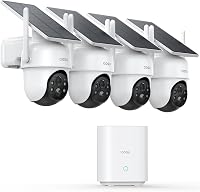
The aosu D1 Classic includes a base and four cameras. The base connects to a router by Ethernet, while cameras connect wirelessly to the base and store activity-triggered recordings there.
Choose a base-centered solar kit if the camera locations get direct sunlight. Skip it if your mounting spots are shaded or you need uninterrupted recording.
For more choices and trade-offs, see our best DIY security camera systems.
Do you need continuous recording or motion clips?
Choose continuous recording if you want footage throughout the day, including moments before an alert. Choose motion-triggered clips if event coverage fits your needs and you want cameras that can rely on solar charging.
Recording mode is a core buying decision. A camera that saves events may not preserve a quiet moment between detections, even if it has useful person or vehicle alerts.
The Reolink PoE kit describes 24/7 recording to its included 2TB hard drive. The ANNKE kit also describes continuous recording to a pre-installed 1TB hard drive.
The ANNKE 3K Lite includes eight 1080p wired cameras, an 8-channel DVR, a 1TB hard drive and eight 60 ft BNC cables. It can record to the hard drive without internet, while remote access and playback need an internet connection.
The eufyCam C37 and aosu D1 Classic use event-based recording approaches. The C37 does not support 24/7 continuous recording, even when connected to HomeBase Mini.
Pick based on the moments you need to retrieve. Continuous video preserves more context but generates more footage to review; event clips focus attention on detected activity.
How much local or cloud storage do you need?
Choose storage based on how long you want to keep footage and how often your cameras record. Hard drives, built-in storage and cloud services differ in capacity, access and ongoing cost.
Local storage keeps recordings on equipment at home, such as a recorder or base. Check capacity, overwrite behavior and whether you can expand storage later.
The Reolink kit includes a 2TB hard drive, while the ANNKE system includes a 1TB hard drive. The aosu base has 32GB of local storage for activity-triggered clips.
The eufy HomeBase Mini has 64GB built-in storage, expandable up to 1TB with a separate microSD card. That kit does not require cloud storage for its local recording approach.
Capacity alone does not tell you how many days of footage you'll keep. Camera count, video settings, recording schedule and motion activity all affect retention.
Use how long security camera footage lasts to think through retention needs. For privacy, access and recurring costs, compare cloud vs local storage for camera video.
How should you estimate storage needs?
Estimate storage by considering camera count, recording mode and the amount of motion at each location. A driveway camera facing a busy street may produce more event clips than a camera watching a quiet side entrance.
If you want to keep footage for a specific number of days, check the system's retention controls and whether older footage is overwritten automatically. Keep a separate export of important clips if the system supports it, since routine recording may eventually replace old files.
A larger drive can help retain more footage, but it does not improve camera coverage or alert accuracy. Choose capacity after deciding which views and recording schedule matter.
Where should you place the cameras?
Place cameras to cover useful approach paths and entry points while avoiding views you do not need to record. Check each camera's view, night mode and power needs at the intended location.
Start with a coverage map. Mark the front door, back door, driveway, side path and detached structures, then note which mounting spot can see each area without an obstruction.
Avoid expecting one camera to show every side of a home. A wide view can cover more space, while a closer view can make people and vehicle details easier to inspect.
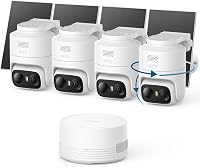
Check sunlight before choosing solar cameras. The eufy C37 has detachable solar panels that can sit apart from the cameras, while the aosu cameras have integrated panels that need unobstructed direct sunlight for effective charging.
Night visibility also changes placement choices. A camera aimed toward a bright porch light or headlights may have a different view than one aimed at a darker path.
Review best night vision security camera systems if your main concern is a dark yard or driveway.
How can you reduce blind spots?
Use overlapping views at entrances where a person might pass from one camera's area to another. Check the view from camera height before drilling, and consider whether doors, roof edges, trees or parked vehicles block the scene.
A pan-and-tilt camera can follow movement across a broad area, but a moving view changes what it sees at any moment. A fixed camera keeps a consistent view of one entrance or path.
Choose based on whether you value tracking movement or watching a specific point without interruption.
Which home security camera system fits your setup?
Choose a system by matching its recording method, camera power and wiring needs to your home. These four kits range from solar wireless cameras to wired recorders with hard drives.
eufyCam C37: solar cameras with a separate base
The eufyCam C37 suits a buyer who wants wireless outdoor cameras, separate solar panels and local storage through HomeBase Mini. The kit includes four cameras, four detachable solar panels and the base.
The C37 offers 360° pan and tilt, auto tracking and 2K color night vision with a spotlight. HomeBase Mini's 64GB built-in storage can expand to 1TB with a separate microSD card.
Buy it if you want adjustable solar panel placement and event clips. Skip it if you need continuous recording, HomeKit support or compatibility with HomeBase 2.
It works with HomeBase 3 or HomeBase Mini.
See our eufy C37 kit review for more on its fit and limits. To compare it with another solar kit, read aosu vs eufy.
aosu D1 Classic: four solar cameras and event storage
The aosu D1 Classic suits someone who wants four outdoor cameras, a shared base and event recording without camera power cables. The base connects to the router through Ethernet, and the cameras connect wirelessly to the base.
The app can show four live camera feeds at once. The cameras offer pan, tilt, auto tracking and 2K full-color night vision; the base supports up to four cameras.
Choose it if a centralized base and event clips fit your routine. Skip it if you need HDMI or TV output from the base, continuous recording or shaded camera locations.
Reolink RLK8-520D4: PoE cameras and NVR recording
The Reolink RLK8-520D4 suits a fixed installation with cable routes to cameras and a central NVR. It includes four cameras, an 8-channel NVR, a 2TB hard drive and network cables.
The system supports continuous recording and person, animal and vehicle detection. Its included hard drive is described as storing up to ten days before overwriting, with actual retention depending on recording use.
Choose it if you want wired recording and potential room to expand. The NVR has eight channels, but confirm camera compatibility before adding equipment.
Skip it if you cannot route Ethernet cable to your chosen locations.
ANNKE 3K Lite: eight wired cameras and DVR storage
The ANNKE 3K Lite suits a buyer who wants eight included cameras and a DVR with local hard drive recording. The kit includes a 1TB hard drive, eight 1080p cameras and eight 60 ft BNC cables.
The DVR supports several camera formats and can work with compatible cameras. The included cameras are 1080p, and the system supports continuous recording plus human and vehicle detection.
Choose it if you need eight fixed camera positions and can route BNC cable. Skip it if you want a wire-free setup or need remote access when internet is unavailable.
How should you set up a home security camera system?
Set up the recorder or base first, confirm that each camera connects and records, then mount cameras after checking the live view. This order helps catch network, power and coverage problems before you make permanent holes.
Use a temporary placement check before drilling. Hold or lightly position each camera at the planned height, open the app or recorder view, and confirm that the approach path and entry point are visible.
For a wired kit, place the recorder where it can reach power, the router if needed and the planned cable runs. Route and label cables by camera location so later maintenance or troubleshooting is simpler.
For a wireless kit, set up the base near the router, then check the connection at each camera location. Solar panels need sunlight, and detachable panels can be positioned separately from the camera when the kit supports it.
Once mounted, set detection zones and alert preferences around the areas that matter. Walk through each monitored path and review the saved clip or live view to confirm that the camera sees the intended activity.
What should you check after installation?
Confirm the date and time, recording schedule, storage status, app access and alert settings. Test remote viewing from the device and network you expect to use when away from home.
Review a daytime and nighttime view from each camera. Trim back foliage or adjust the angle if branches, reflections or exterior lighting obscure the scene.
What mistakes should you avoid when buying a home security camera system?
The most common buying mistakes are choosing by camera count alone, overlooking power and cable needs, and assuming wireless cameras record continuously. Check the full installation and recording plan before you choose a kit.
Don't assume solar means maintenance-free in every location. Sunlight, panel angle, weather and frequent triggered events affect charging.
A shaded camera location may not stay charged as expected.
Don't confuse motion detection with recording coverage. Detection may trigger an alert or clip, but it does not automatically mean the camera records continuously or captures every moment before activity.
Don't overlook compatibility. The eufy C37 requires HomeBase 3 or HomeBase Mini and does not support HomeBase 2 or HomeKit.
The aosu cameras are designed to connect through the included aosuBase.
Don't point cameras at areas that do not help you monitor an entry or approach. Tighten the view to the places you care about, and use privacy settings where available.
Finally, don't postpone storage decisions. A system can appear to work while older footage is being overwritten sooner than you expect.
Set a review habit for storage and save important clips elsewhere if needed.
What should you check before buying a camera kit?
Check coverage, recording schedule, storage, power, network, installation and compatibility before choosing. A kit may need cable routes, a specific base or a sunny mounting location.
Use this checklist:
- Coverage: Which doors, paths and outdoor areas need a view?
- Recording: Do you need continuous video or event clips?
- Storage: Where are recordings saved, and how long do you want them available?
- Power: Does each camera use PoE, an adapter, battery or solar charging?
- Network: Do cameras connect to Wi-Fi, a base or a wired recorder?
- Installation: Can you reach each location and route the required cables?
- Compatibility: Does the kit require a specific base, recorder or camera family?
- Remote access: Which features need internet, and which work locally?
- Review routine: How will you find and save a clip when something happens?
A camera count helps only when the cameras cover areas you care about. Sketch the locations, note sunlight and cable access, then decide how many views you actually need.
If avoiding camera wires is a priority, compare battery security camera systems and solar-powered camera systems. If you want a wired recorder, see best NVR camera systems for a home.
Which home security camera system should you choose?
Choose a wired NVR or DVR system if you want continuous local recording and can route cables to fixed camera locations. Choose a solar wireless kit if easier mounting and activity-triggered clips suit your coverage plan.
For PoE recording, compare the Reolink kit's NVR and hard drive with the ANNKE kit's DVR and eight wired cameras. For wire-free placement, compare the eufy C37's detachable solar panels with the aosu kit's integrated panels and shared base.
If night views drive your decision, use our guide to best night vision security camera systems. Then narrow your choice with the recorder camera kits guide and confirm how camera systems work before you settle on a setup.
Frequently asked questions
What type of home security camera system is best?
The best type depends on your recording and installation needs. Choose a wired recorder system if you want continuous recording and can route cables; choose a wire-free kit if you want simpler camera placement and event-based recording.
Check each system's storage, power, network and compatibility needs before you buy.
Is a wireless security camera system reliable?
A wireless system can work well when cameras have a steady connection to their base or network and enough power. Wireless describes the camera connection, not necessarily the recorder's internet connection or its power source.
Check whether cameras use batteries, solar charging or a power cable, and where recordings are stored.
Do home security cameras need internet?
Internet is usually needed for remote viewing and alerts, while some recorder systems can keep recording locally without it. The ANNKE system described here can record to its hard drive without internet; remote access and playback need internet.
Confirm the offline functions of the system you choose.
How many cameras should a home security system have?
Start with the areas you need to see, such as doors, driveway, side paths or a detached garage. A four-camera kit can cover several points, while an eight-camera kit offers more included cameras.
Check camera views and cable routes before choosing by count alone.
Should I choose an NVR or DVR security system?
An NVR records video from network cameras, often over Ethernet or PoE, while a DVR commonly works with coaxial wired cameras. Your choice depends on the camera type, cabling, recorder features and expansion needs.
See our NVR vs DVR comparison before choosing a kit.