How to Wire Security Cameras at Home
To wire security cameras at home, connect each compatible wired camera to its recorder or PoE switch with the cable type it requires. Plan the route, protect outdoor connections, and test recording before you conceal the cable.
On this page (9 sections)
- What do you need to wire security cameras at home?
- Should you connect cameras to an NVR or a PoE switch?
- How do you plan a camera cable route?
- How do you wire a PoE camera step by step?
- How should you protect outdoor camera cables?
- How do you check the wiring before hiding it?
- What mistakes should you avoid when wiring home cameras?
- Can you wire security cameras without an electrician?
- Which wired camera setup should you choose?
To wire security cameras at home, connect each compatible camera to its recorder or PoE switch with the right cable, then connect the recorder to a monitor and network as needed. Plan routes before drilling, protect outdoor connections from water, and follow local electrical rules.
This guide covers low-voltage IP cameras, especially Power over Ethernet (PoE) systems. The right layout depends on the camera ports, recorder, cable path, and whether you need remote viewing.
What do you need to wire security cameras at home?
For a PoE setup, you need compatible PoE cameras, an NVR or PoE switch, Ethernet cable, and a display for setup. Cable clips, labels, a drill, and weather-rated boxes or fittings may also help, depending on the route.
An NVR with PoE ports can connect cameras directly. A separate switch is useful when the recorder lacks enough powered ports or the cameras are grouped farther from it, but the network layout must match the equipment instructions.
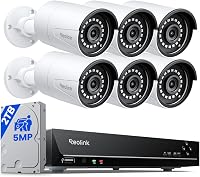
The Reolink system suits homeowners who want a wired four-camera kit with local recording and room to add cameras. Its NVR has 8 channels, and Reolink specifies cable runs up to 330 ft; skip it if you want a wireless-only setup or cameras from another brand, since this system is designed for Reolink PoE cameras.
If you need a separate switch, the TP-Link LS108GP has 8 PoE+ ports and a 65 W total power budget. It suits a group of compatible cameras that need one shared switch; skip it if your NVR already has enough PoE ports or the cameras exceed its power budget.
Choose cable for both the camera's power needs and the path. The Brozzag outdoor cable has a direct-burial jacket, but its copper-clad aluminum conductors make it a low-power PoE option, not a safe default for higher-power cameras.
For a closer look at how the pieces connect, read how a home security camera system works. If you are still choosing a recorder, start with home security camera systems.
Should you connect cameras to an NVR or a PoE switch?
Connect cameras directly to the NVR when it has compatible PoE ports and the cable reaches. Add a PoE switch when you need more powered ports or a better place to group cable runs.
Check the number of channels and the number of PoE ports separately. An NVR may support more cameras than it can power directly, so confirm how each extra camera will connect.
Before buying a switch, match its PoE standard and power budget to the cameras. The TP-Link LS108GP supports up to 30 W per port and 65 W total, so check the camera requirements and total load rather than assuming every port can supply its maximum at once.
How do you plan a camera cable route?
Map each route from camera to NVR or switch before drilling or fastening cable. This helps you estimate cable length and avoid sharp edges, heat sources, moving parts, and spots where doors or windows could pinch a run.
Mark camera positions and measure along the path, including turns and wall passages. Leave a small service loop at each end so you can reach connectors later, but secure excess cable so it cannot snag.
Check both sides of a planned hole for pipes, wiring, insulation, and structural parts. Use a cable finder or qualified professional when you cannot tell what is behind the surface.
For exterior runs, use cable rated for its location and protect wall entries from water and pests. Follow local rules for exterior penetrations and burial depth, and arrange utility marking before digging.
See how to hide security camera wires outside for ways to keep outdoor runs tidy. For a long PoE route, check how far you can run PoE cameras before settling on where to put the recorder or switch.
How do you wire a PoE camera step by step?
Run and label one cable at a time, then connect it according to the camera and recorder instructions. This makes it easier to catch a wrong port or damaged cable before you finish the installation.
- Turn off and unplug the equipment before connecting or moving cables.
- Run the cable along the route you planned, clear of hazards.
- Label both ends with the camera location.
- Connect one end to the camera's network port.
- Connect the other end to a compatible PoE port on the NVR or switch.
- Connect the recorder to its display and network as directed.
- Power up and check each camera's live image and recording.
Don't cut off factory connectors unless the instructions call for it and you have the right tools and replacement connectors. A poorly fitted plug can interrupt the network connection or PoE power.
Some wired cameras use separate power and video cables. Follow their wiring diagram instead of using a PoE layout; this guide to camera power options explains the common approaches.
How should you protect outdoor camera cables?
Use cable and fittings rated for the route, and keep connections protected from moisture. An outdoor-rated cable jacket does not make an exposed connector waterproof.
Use a weather-rated box or fitting for an outdoor connection. Seal wall penetrations with a material suited to the surface and local rules, and route cable entries downward when the equipment design allows it.
For buried runs, confirm that the cable is rated for direct burial and follow local depth and utility-marking rules. Don't assume a dark cable jacket means it can go into soil or standing water.
The Brozzag cable is described as direct-burial and UV-resistant, and it supports PoE for low-power devices. Because it uses copper-clad aluminum conductors, choose it only when the camera's power needs fit that limit.
How do you check the wiring before hiding it?
Check live view, recording, and remote access separately before closing walls or concealing cable. A live picture does not confirm that the recorder is saving footage.
Test one camera at a time. Make sure it appears in the recorder's camera list, shows a stable image, and has a recorded clip you can play back.
Then check remote viewing if you plan to use it. Some systems need internet for remote access, while local recording can work offline; Reolink says local recording works without internet on its system.
If a camera stays offline, check the cable ends, port, and power status first. Try a short, known-good cable near the recorder to isolate a long-run issue, then inspect the installed route for damage or moisture.
What mistakes should you avoid when wiring home cameras?
The most common wiring mistakes are mismatched equipment, unplanned cable routes, and skipped recording checks. Fixing those during setup is easier than reopening a wall or moving a camera later.
- Assuming every Ethernet port supplies power: use a PoE port or a compatible separate power supply as the camera requires.
- Ignoring the power budget: add up the camera needs and compare them with the switch's total PoE budget.
- Buying cable by category name alone: check its location rating, conductor type, run length, and compatibility with the camera's power draw.
- Hiding cable before playback checks: confirm each camera records and that clips can be played back first.
- Leaving outdoor plugs exposed: protect connections and wall entries against moisture.
- Running cable beside hazards: avoid sharp edges, heat, pinch points, and uncertain electrical routes.
A little labeling helps later, too. Mark both cable ends with a room or camera name so you can identify the right connection when troubleshooting.
Can you wire security cameras without an electrician?
You can often route low-voltage camera cable yourself if the path is clear and local rules allow it. Use a qualified electrician for mains wiring, uncertain electrical work, or drilling near hidden utilities.
Keep camera cable separate from mains wiring unless local code and the cable rating allow a shared route. Never connect a low-voltage camera cable to a mains outlet or open a powered device to change its wiring.
Rules for attic runs, exterior walls, and buried cable vary by location. Check local requirements before starting, especially if a run passes through a fire-rated wall or shared space.
Which wired camera setup should you choose?
Choose a direct-to-NVR PoE kit for a straightforward multi-camera install, a separate switch when you need more flexible port placement, and outdoor-rated cable that matches the camera's power needs. If your route involves mains power, uncertain utilities, or rules you cannot confirm, bring in a qualified electrician.
The Reolink kit fits a home that wants four wired cameras, local recording, and an 8-channel NVR. Choose the TP-Link switch only when a separate switch solves a port or placement need and its power budget fits; choose the Brozzag cable for a suitable outdoor low-power PoE run.
For a final recorder comparison, see the best NVR camera systems for a whole house. Plan the full route first, confirm compatibility, and test every camera's recording before concealing the cable.
Frequently asked questions
How are security cameras wired?
Wired cameras commonly use Ethernet for data, and Power over Ethernet (PoE) can carry power over that same cable when the camera and recorder or switch support it. Other systems use separate power and video cables.
Check the camera and recorder instructions to confirm the cable, connectors, and power method.
Can I wire security cameras myself?
Many homeowners can route low-voltage camera cable and connect compatible plugs, but the job depends on the route and equipment. Follow local rules, avoid power wiring, and use a qualified electrician for mains connections or any work you cannot do safely.
How far can a PoE camera cable run?
The maximum depends on the camera, recorder or switch, cable, and mode in use. Check each device's instructions and plan a route within its stated limit; a longer run may need a suitable network design or a different location for the recorder or switch.
Do wired security cameras work without internet?
Some systems continue recording locally without internet, while remote viewing and alerts may need a network connection. Check the system's instructions for which functions work offline, and test local recording before relying on it.