How Far Can You Run PoE Cameras From the Recorder?
You can usually run a PoE camera up to 328 ft (100 m) per Ethernet cable segment. For how far you can run PoE cameras in your home, count the full cable path, check power needs, and plan switches or extenders where needed.
On this page (9 sections)
- How far can you run PoE cameras from a recorder?
- What affects the usable distance for PoE cameras?
- Can a PoE switch or extender increase camera distance?
- Which cable should you use for an outdoor PoE camera?
- When does an included camera cable make sense?
- How should you plan and install the cable route?
- What common PoE camera cable mistakes should you avoid?
- What should you do if a camera is beyond the cable limit?
- How far can you run PoE cameras reliably?
You can usually run a PoE camera up to 328 ft (100 m) per Ethernet cable segment. To decide how far you can run PoE cameras at your home, measure the full cable route, check camera power needs, and account for switches or extenders.
That distance is a planning limit for a compliant Ethernet channel, not a promise that every camera and cable will work at the edge. Check the camera, recorder, and network equipment manuals before running cable through walls or underground.
How far can you run PoE cameras from a recorder?
Plan for no more than 328 ft (100 m) on one Ethernet cable segment. Count the full channel, including patch cords and other cable between devices.
Some NVR kits have PoE ports built into the recorder, so each camera connects directly to a port. Other setups use a PoE switch to send network traffic from the cameras to the recorder.
In either layout, each cable segment must stay within its supported limit.
Measure the route the cable will follow, rather than the straight-line distance between the recorder and camera. Wall runs, attic routes, turns, and drops to the camera all add length.
For more context on how cameras, network links, and recorders fit together, see how a home security camera system works.
How far can you run a PoE camera with patch cords included?
Include patch cords when you measure the Ethernet channel. A permanent run near the limit may exceed it once you add the cords at the recorder and camera.
Mark the route and leave enough slack to make connections without stretching or sharply bending the cable. Keep the total length within the equipment’s stated limit.
What affects the usable distance for PoE cameras?
Cable suitability, camera power draw, and network layout affect whether a long run works reliably. The 328 ft limit applies to a cable channel within Ethernet requirements, not every cable with RJ45 connectors.
Use cable suited to the location and device. Damaged conductors, poor terminations, tight bends, and unsuitable outdoor cable can cause connection problems even on shorter runs.
Power matters too. The camera must receive enough power, and the PoE switch or NVR must have a sufficient per-port and total power budget.
Label both ends of each cable and keep connections reachable. Accessible connections make it easier to find a bad termination or power issue before closing a wall or covering a route.
Can a PoE switch or extender increase camera distance?
A compatible switch or extender can add another network segment, but it does not extend the limit for a single cable. Each segment still needs to stay within its supported length and power limits.
A switch along the route needs power and a suitable location. Confirm that it works with the camera and recorder, and check that the recorder’s network setup supports cameras connected through a separate switch.
The TP-Link TL-SG1005P has 4 PoE+ ports and a stated 65 W total PoE budget. It suits a small camera setup that needs a separate powered network point, provided its per-port and total limits meet the cameras’ needs.
Use one of its PoE+ ports for a camera that needs power over Ethernet. Its fifth port is non-PoE, so it can carry data but won’t supply camera power.
Which cable should you use for an outdoor PoE camera?
Choose cable for the route, then verify that its conductor and PoE rating suit the camera. Outdoor or direct-burial cable can help protect a run exposed to sun, rain, or soil.
The Cat6 Outdoor Direct Burial Cable, 100 ft has an LLDPE jacket and is described for outdoor and direct-burial use. Its conductors are copper-clad aluminum, and Brozzag recommends it for low-power PoE while advising buyers to verify compatibility for higher-power devices.
This cable suits a shorter outdoor route when its PoE limits match the camera. Skip it for a higher-power camera unless you can confirm compatibility.
An outdoor jacket alone does not settle how a cable should be buried. Follow local rules for burial depth and separation from power lines, and use conduit where the route or local code calls for it.
For longer outdoor runs, see how to hide security camera wires outside the house, which covers ways to protect and conceal exposed cable.
When does an included camera cable make sense?
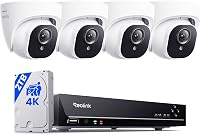
Use an included cable when it reaches the camera location and fits the route. The Reolink RLK8-410B6 5MP PoE System includes six 18 m network cables, which can suit shorter camera placements from its NVR.
The system connects each camera to its NVR with one network cable for power and video. Choose it if that direct connection fits your layout; skip it if your planned routes exceed the included lengths and you haven’t confirmed a suitable alternative cable.
Before installing the kit, map each camera position and check the required cable length. For a separate switch or longer route, consult the camera and NVR instructions before buying cable or equipment.
How should you plan and install the cable route?
Measure the full path and keep each segment within the equipment’s limits. Include vertical drops, turns, and the connection length at both ends.
Sketch each route from the NVR or switch to the camera. Note whether the cable passes through an attic, outdoors, or near electrical wiring, then choose cable and protection suited to those conditions.
Connect and confirm the camera at its intended location while the route is still accessible. This helps you find a weak connector or power problem before sealing walls or covering the cable.
For a step-by-step layout, read how to wire security cameras at home. If you’re comparing power methods, how security cameras are powered explains plug-in, PoE, battery, and solar setups.
What common PoE camera cable mistakes should you avoid?
The most common mistake is measuring only the straight-line gap and ignoring the complete cable path. That can put the actual channel over its limit after routing and patch cords are added.
Don’t assume a camera that powers on briefly will keep a stable connection at the end of a long run. Video dropouts or a camera disappearing from the recorder can point to cable, power, connector, or network problems.
Avoid placing active equipment where it can get wet, overheat, or become impossible to reach. Check its power source, weather protection, and maintenance access before installation.
Don’t assume every outdoor cable is suitable for every PoE camera. Verify the cable’s conductors and PoE compatibility against the camera’s power needs.
What should you do if a camera is beyond the cable limit?
Add a compatible switch or extender, or choose a network layout designed for the longer route. Don’t try to solve a distance problem by exceeding the cable’s rating.
Place active equipment where it can be powered, protected from weather, and reached for service. Confirm network compatibility, PoE support, and the total power budget before buying or installing it.
If a camera fails at the end of a long run, first connect it with a shorter known-good cable. Then inspect connectors, confirm the available power budget, and check the NVR or switch instructions for supported layouts.
How far can you run PoE cameras reliably?
Keep each Ethernet segment at or below 328 ft (100 m), with room for patch cords and the actual route. Choose cable suited to the location and check that the camera receives enough PoE power.
Pick a direct NVR connection when the included cables and camera locations fit your home. Choose a separate PoE switch or extender when you need another network point, and verify its power, placement, and compatibility first.
If you’re choosing a wired kit, compare the best NVR camera systems for a whole house. Match the recorder connections and included cables to the camera locations you can reach.
Frequently asked questions
How far can a PoE camera be from an NVR?
A common Ethernet channel limit is 328 ft (100 m) per cable run, including patch cables. The exact route depends on the camera system's network design, cable type, and power needs.
Check the NVR and camera manuals, and plan the connection so each Ethernet segment stays within its stated limit.
Can I run PoE camera cable farther than 328 ft?
You can extend a network path with compatible active equipment, such as a PoE switch or extender, but each cable segment has its own distance limit. Confirm that the equipment supports your camera's power needs and that the recorder can reach the camera across the resulting network path.
Does a longer Ethernet cable reduce PoE camera power?
Cable resistance can affect how much power reaches a camera, especially over long runs or with cable that is unsuitable for the device. Check the camera's power requirements, cable quality, and the switch or NVR's PoE budget.
Keep within the limits in each device's manual.
Can I bury Ethernet cable for a PoE camera?
Use cable rated for the route and local installation rules. Direct-burial cable is made for underground use, while ordinary indoor cable may need protection in conduit or another approved pathway.
Avoid running cable where digging, moisture, or electrical interference could damage it.