How Does a Home Security Camera System Work?
A security camera system captures video, sends it to local storage or cloud storage, and lets you watch live feeds or recordings on a monitor or phone. How it connects and gets power depends on whether you choose wired, Wi-Fi, battery, or solar cameras.
On this page (9 sections)
- How does a security camera system work from camera to screen?
- What parts does a home camera system need?
- How do wired, Wi-Fi, and solar systems send video?
- Where does a security camera system store footage?
- How can you watch live video or review recordings?
- Does a home security camera system work without internet?
- How should you choose and set up a camera system?
- What common setup mistakes should you avoid?
- Which camera system should you choose?
A security camera system captures video, saves it, and lets you view live or recorded footage. If you're asking how does a security camera system work, follow the path from camera to connection, storage, and screen; the details depend on the system's power and network setup.
The cameras watch selected areas and send video through a cable or Wi-Fi. A recorder, hub, or cloud service stores it, while a monitor or app lets you view feeds and recordings.
How does a security camera system work from camera to screen?
A camera turns light into video and sends it to a recorder, hub, or cloud service. You can view the live feed or saved footage on a monitor or phone.
In a wired setup, cameras may connect directly to a DVR or network video recorder (NVR). In a Wi-Fi setup, cameras send video through the wireless network to an NVR, hub, or cloud service.
The recorder or service sorts video by camera and time. Motion detection can mark events or send alerts, depending on the system and its settings.
An internet connection can enable remote access, app alerts, and cloud features. Some systems continue local recording without internet, but checking the feed while away from home generally requires a connection.
What parts does a home camera system need?
A home camera system needs cameras, a way to carry video, power, storage, and a screen or app. A kit may bundle several of those parts together.
- Cameras capture the areas you want to monitor.
- Connections carry video by cable or Wi-Fi.
- Power keeps cameras and recorders running.
- Storage saves footage on a hard drive, hub, memory card, or cloud service.
- A screen or app shows live feeds, alerts, and recordings.
A recorder kit may include cameras, cables, a DVR or NVR, and a hard drive. For help matching those parts to your home, see how to pick the right home security camera system.
What does the recorder do in a security camera system?
A DVR or NVR collects video from cameras and saves it for later viewing. A DVR generally works with cameras connected by video cable, while an NVR records video sent over a network.
The recorder may provide live viewing, playback, motion event search, and connections for a monitor or router. Storage capacity and recording settings affect how much footage it can keep before older video is overwritten.
Read what an NVR system is and whether you need one for more on network video recording.
How do cameras in a security system get power?
Cameras get power from an adapter, Power over Ethernet (PoE) cable, battery, or solar panel paired with a battery. The power source and video connection are related, but they aren't always the same.
A Wi-Fi camera still needs electricity even though it sends video without a data cable. See how security cameras are powered for help comparing plugs, PoE, batteries, and solar.
How do wired, Wi-Fi, and solar systems send video?
Wired systems use cables for power, video, or both; Wi-Fi systems send video over a wireless network. Solar can help power a camera, but the system still needs a way to send and store video.
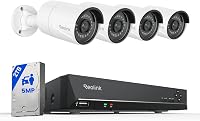
Choose a wired kit when you can route cables to the cameras and recorder and want local recording on a hard drive. The ANNKE kit includes 4 wired cameras, BNC cables, a DVR, and a 1TB hard drive.
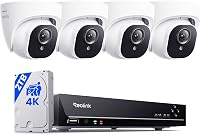
Choose a Wi-Fi NVR when you want wireless video connections between the cameras and recorder. The Hiseeu kit includes 4 cameras, an NVR, and a 500GB hard drive, but its cameras and recorder still need power.
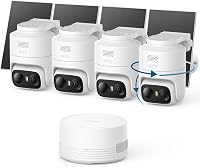
Choose a solar camera kit for outdoor spots with sunlight where running a power cable is difficult. The aosu kit includes 4 solar cameras, an aosuBase hub, and local 32GB storage.
Before choosing, check where each camera will get power and how its video will reach storage. See how to wire security cameras at home for cable routing and installation guidance.
Where does a security camera system store footage?
A system stores footage locally, in the cloud, or in both places, depending on its design. Local storage may use a DVR, NVR, or hub; cloud storage sends video to an online service.
Local recording keeps footage on equipment in your home and may continue through an internet outage if the cameras, recorder, and local connection still work. Remote viewing, cloud backup, and app alerts may depend on internet access.
Cloud storage can make clips available outside the home, but features may require an account or paid plan. Check how long clips remain available, what triggers recording, and whether there's a subscription fee.
Some systems record continuously, while others save clips when they detect motion. Recording mode, storage capacity, and video quality all affect how long footage stays available; compare the tradeoffs in cloud versus local security camera storage.
How can you watch live video or review recordings?
You can watch camera feeds on a connected monitor, through an app, or both. A monitor may connect directly to a recorder, while remote phone viewing usually requires an internet connection.
Open the camera app or select a camera on the recorder's screen to see a live feed. For a past event, use the playback timeline or search tools to find the right camera and time.
A motion alert means the camera detected activity; it doesn't guarantee that a full recording was saved. Check recording settings if you need footage from a particular area or time.
Does a home security camera system work without internet?
A system with local recording may keep saving video without internet, as long as its cameras and recorder have power and can still communicate. Remote viewing, cloud storage, or app alerts may stop until the connection returns.
A camera that depends on cloud storage may not save footage during an outage. Check which features work offline and whether you need a local recorder to keep footage available at home.
How should you choose and set up a camera system?
Choose a system by matching its cable needs, power source, storage, and viewing method to the places you want to monitor. Start with the camera locations, then check whether each has power and a clear connection to the recorder or network.
A wired DVR kit suits a fixed layout where you can run cables and want local storage. Skip it if cable routes are impractical or you need to move cameras often.
A Wi-Fi NVR suits a home where wireless video connections simplify camera placement and power is available nearby. Skip it if the camera locations have weak Wi-Fi or lack a convenient power source.
A solar kit suits outdoor locations that get direct sunlight and have no easy outlet nearby. Skip it for shaded spots where the panel cannot recharge the camera reliably.
Before mounting, test the intended camera view from each location and check that the wireless signal reaches the recorder or router. Mount cameras where the target area is visible, keep lenses clear of obstructions, and follow the system's pairing and recording instructions.
Set recording mode, motion zones, notification preferences, and user access before relying on alerts. Review a short clip from each camera to confirm that the right area is recorded and that timestamps and playback are easy to find.
What common setup mistakes should you avoid?
The most common mistakes are choosing cameras before planning power and signal, overlooking storage needs, and assuming an alert means footage was saved. Check those points before fixing cameras in place.
- Ignoring power: Wi-Fi describes the video connection, not necessarily the power source. Confirm how each camera and recorder will be powered.
- Skipping a signal check: A camera can be within mounting reach but too far from reliable Wi-Fi. Check the connection at the planned location.
- Choosing storage without a retention plan: Continuous recording and motion clips use storage differently. Decide how much footage you need to keep and check how older files are handled.
- Leaving default motion settings: Alerts can be less useful when zones include busy areas. Adjust the detection area and notification schedule.
- Never checking playback: A live feed doesn't confirm that recordings are saved correctly. Review footage from each camera after setup and check it periodically.
Which camera system should you choose?
Pick the ANNKE kit if you can route cables and want four cameras recording to a DVR with a 1TB hard drive. Pick the Hiseeu kit if you prefer Wi-Fi video connections to an NVR and have power available at every camera location.
Pick the aosu kit for outdoor areas with sunlight where solar power and a hub with local storage fit your setup. If no option matches your locations, compare the broader home security camera system choices before buying.
In short, how a security camera system works depends on the path from camera to power, connection, storage, and screen. Choose the setup that fits your camera locations first, then confirm that it records and plays back the footage you need.
Frequently asked questions
How does a security camera system work?
A security camera captures video and sends it to a recorder, local storage hub, or cloud service. You can watch a live feed or play saved footage on a monitor or phone.
The camera needs power, and remote viewing generally needs an internet connection.
Do security cameras record if the internet goes out?
Some systems keep recording to a local DVR, NVR, or hub during an internet outage, but remote viewing and alerts may stop. Check the system's instructions to confirm what it records offline and whether cameras still have power and a working local connection.
What is the difference between Wi-Fi and wired security cameras?
Wi-Fi cameras send video over a wireless network, while wired systems use cables for video or network connections. Either type may still need a separate power source.
A Wi-Fi system can record locally, and a wired system may connect to the internet for remote access.
Do security cameras need a recorder?
No. Some cameras save clips to cloud storage or a built-in hub, while recorder-based systems send video to a DVR or NVR with local storage.
Choose based on how you want to save, search, and access footage, and check whether a subscription is required.