What Is an NVR System, and Do You Need One?
An NVR system records video from network cameras and saves it to local storage. If you're asking what is an NVR system, think of it as a central recorder for compatible IP cameras, with power and network needs that depend on the camera setup.
On this page (8 sections)
- What is an NVR camera system, and what does it do?
- How does an NVR connect to cameras?
- How is an NVR different from a DVR?
- How much storage does an NVR need?
- How do you choose the right NVR system?
- How should you set up and care for an NVR?
- What mistakes should you avoid with an NVR?
- Is an NVR system right for you?
An NVR system records digital video from network cameras and stores it on a drive. If you're asking what is an NVR system, it is a central recorder for compatible IP cameras, useful when you want local footage from several cameras and can plan for their power and network connections.
NVR means network video recorder. The recorder receives video from IP cameras, organizes it, and lets you review saved footage.
Some systems record continuously, while others can record motion events or offer both options.
A complete NVR setup includes cameras, a recorder, storage, power, and a way for the cameras and recorder to communicate. For a broader view of how those parts work together, see how a home security camera system works.
What is an NVR camera system, and what does it do?
An NVR camera system combines compatible IP cameras, a network video recorder, and storage. The cameras send digital video over Ethernet or WiFi, and the recorder saves it for later playback.
Many kits include cameras matched to a recorder, which simplifies the first setup. If you plan to add cameras later, confirm that the recorder supports them; an open channel does not guarantee compatibility with every IP camera.
The recorder can also manage settings, motion events, and remote viewing through an app, depending on the system. Local recording and remote access are separate needs: a system may keep recording on the local network even when internet access is unavailable, while viewing footage away from home generally depends on online access.
How does an NVR connect to cameras?
An NVR connects to cameras over Ethernet or WiFi, depending on the kit. The right connection depends on whether you can run cable to camera positions or have reliable WiFi and power there.
What is PoE on an NVR system?
PoE means Power over Ethernet. One Ethernet cable carries power and video between a PoE camera and a compatible NVR or network switch, so you don't need a separate power cable at each camera.
A PoE layout suits fixed camera positions where you can route cable from the recorder or switch. Map each route before mounting cameras, check the distance and path for obstacles, and leave room to reach the recorder for setup and maintenance.
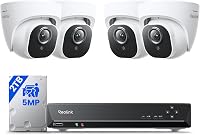
The Reolink RLK8-410B4 kit pairs four 5MP PoE cameras with an 8-channel NVR and a pre-installed 2TB drive. It records continuously and supports person, animal, and vehicle detection, with smart detection requiring current firmware.
For cable planning, read how to wire security cameras at home.
Does a wireless NVR system need cables?
A wireless NVR sends video from cameras over WiFi, but wireless does not necessarily mean wire-free. Cameras and recorder may still need outlet power, and the recorder may need a network connection.
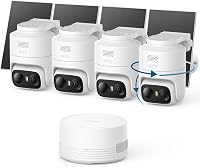
The ANNKE kit connects four dual-lens cameras to a 10-channel NVR over dual-band WiFi. Each camera and the recorder need power, so it suits camera locations with outlets and usable WiFi coverage.
Before buying a wireless kit, check signal strength at each planned camera location. Walls and interference can weaken WiFi, so a camera that connects well near the router may not work as reliably at the edge of the property.
How is an NVR different from a DVR?
An NVR records digital video from IP cameras, while a DVR usually records analog video sent over coaxial cable. The camera types and connections differ, so check compatibility before mixing cameras and recorders.
PoE and WiFi are common NVR camera connection options. A DVR setup generally needs coaxial cable runs to its cameras.
Compare the systems in NVR vs DVR for home security if you're deciding between them.
How much storage does an NVR need?
The storage you need depends on the number of cameras, video settings, recording schedule, and how long you want to keep footage. Continuous recording uses space faster than recording only motion events.
Check the recorder's drive capacity and expansion options against your retention needs. Some systems overwrite the oldest footage when storage fills, so export important clips before they are replaced.
For a better estimate of retention, see how long security camera footage lasts.
A compatible surveillance drive can be useful when an NVR supports adding or replacing internal storage. The WD Purple 4TB is designed for surveillance recording workloads, but its SATA interface and drive size must match the recorder.
Before upgrading a drive, check the recorder's supported interface, physical size, and maximum capacity. For footage you want to keep if the recorder is damaged or stolen, compare cloud and local storage for security camera video.
How do you choose the right NVR system?
Choose an NVR by matching the camera connections, channel count, storage, and recording features to your home. These decisions affect installation and how useful footage will be later.
- Camera compatibility: Check that the cameras included in the kit work with its recorder. Confirm compatibility before buying separate cameras to add.
- Channel count: Count the cameras you need now, then decide whether you want room to expand. The Reolink kit has 8 channels; the ANNKE system has 10.
- Power and connection: Pick PoE if you can route Ethernet to camera locations. Pick WiFi when cable routes are impractical but the cameras can reach reliable WiFi and power.
- Storage and retention: Match the drive capacity and recording schedule to how much footage you want to keep. Check whether the recorder supports storage expansion.
- Recording features: Decide whether you need continuous video, motion recording, or both. Person, animal, and vehicle detection can help focus alerts on the activity you care about.
- Remote access: Check that the system's app offers the live view and playback functions you expect. Remote access usually needs an internet connection.
If you want a ready-matched PoE kit and continuous local recording, the Reolink system fits that setup. The ANNKE kit suits homes that need WiFi camera connections, pan and tilt, and room to add compatible cameras; skip it if you can't provide outlets or reliable WiFi near the cameras.
How should you set up and care for an NVR?
Set up the recorder and cameras before finalizing their positions, then check live views and recording from each location. This helps catch weak WiFi, obstructed views, and cable-routing problems while you can still move equipment easily.
For a PoE kit, connect each camera to the recorder with Ethernet and confirm the live image before mounting it permanently. For a WiFi kit, connect the recorder and cameras as directed, then test each camera at its intended location with doors and windows in their usual positions.
Set the correct time, review motion zones and alert types, and test playback so you know where recordings are stored. Keep the recorder in a ventilated, secure indoor location and check periodically that cameras are online, the drive is recording, and important clips can be exported.
Don't assume a camera is recording just because its live view works. Review saved footage from each camera after setup, then check again after changing network settings, storage, or recording schedules.
What mistakes should you avoid with an NVR?
The most common NVR mistakes are buying cameras without checking compatibility, underestimating power needs, and choosing storage without considering recording habits. A little planning prevents gaps in coverage and missed footage.
- Treating wireless as battery-powered: WiFi cameras can still need outlet power. Confirm the power method before choosing camera locations.
- Filling every channel without a plan: Leave room for future cameras if you expect your coverage needs to grow.
- Ignoring network coverage: Test WiFi where wireless cameras will sit, not just beside the router.
- Assuming drive capacity guarantees a set retention period: Recording mode, camera count, and video settings change how quickly storage fills.
- Skipping playback checks: Confirm that the recorder saves and plays footage before relying on the system.
- Mounting cameras before checking their views: Preview the image, look for obstructions, and adjust the angle before fastening mounts.
For other self-install options, browse DIY security camera systems you can set up yourself.
Is an NVR system right for you?
Choose an NVR if you want one recorder to manage several IP cameras and save footage locally. It fits homes with stable camera power, workable cable routes or WiFi, and a place to keep the recorder.
Pick a PoE kit like the Reolink if you can run Ethernet and want a wired setup with continuous recording. Choose the ANNKE WiFi kit if you need flexible camera angles and can provide outlet power and reliable WiFi.
Skip both if you need cameras with no nearby power; compare other home security camera system options instead.
An NVR is a poor fit when you want a quick temporary setup, cannot plan camera power, or need cameras in locations without suitable network coverage. Start with the best NVR camera systems for a whole house if you want to compare complete kits before choosing.
Frequently asked questions
What does NVR mean in a security camera system?
NVR means network video recorder. It records video sent over a network by compatible IP cameras and stores footage on a drive in the recorder or another supported location.
The cameras still need power, and the recorder needs a network connection for setup or remote access features.
Do NVR cameras need the internet?
An NVR can record locally without internet when the cameras and recorder are connected on the local network and the system supports local recording. Internet access is typically needed for remote viewing, app notifications, or other online features, depending on the system.
Is a wireless NVR system completely wire-free?
No. Wireless usually describes the video connection between cameras and recorder, not the power supply.
Check whether each camera needs an outlet, whether the recorder needs Ethernet to your router, and how the system handles recording if WiFi drops.
How much storage does an NVR need?
The right storage size depends on camera count, resolution, frame rate, recording schedule, and how long you want to keep footage. Continuous recording uses space faster than motion-based recording.
Check the recorder's drive capacity and expansion limits against your retention needs.