NVR vs DVR for Home Security: Which Recorder to Buy (October 2026)
Choose an NVR for PoE IP cameras and a DVR for coaxial analog cameras. Your existing wiring, camera compatibility and installation plan matter more than the recorder name alone.
On this page (8 sections)
- NVR vs DVR for home security: how do they connect?
- Which recorder is easier to install?
- Which system suits existing wiring?
- How should you compare channels and cameras?
- What video features matter more than the recorder label?
- How much storage should the recorder have?
- Which NVR and DVR systems fit these needs?
- NVR vs DVR: which recorder should you buy?
Choose an NVR for PoE IP cameras and a DVR for coaxial analog cameras. For NVR vs DVR home security, the best recorder depends on the cameras you plan to connect and the wiring that suits your home.
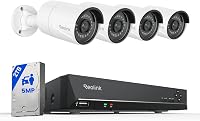
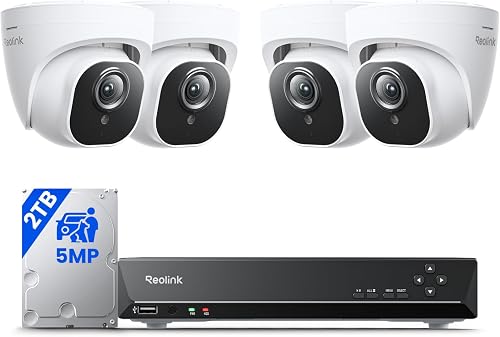
The Reolink kit pairs an 8-channel recorder with wired PoE cameras. The ANNKE DVR kits use wired cameras, including models that connect through coaxial BNC cable.
Both recorder types can store footage locally, but remote access features vary by kit. Start with the camera connection, then compare the included cameras, hard drive and detection features.
 Best for an 8-camera DVR kit
ANNKE 3K Lite 8-Channel 8-Cam Wired System
NVR vs DVR for home security: how do they connect?
An NVR works with network cameras, while a DVR works with analog cameras. The connection type determines which cameras can send video to the recorder.
A PoE camera connects to a compatible NVR over Ethernet. In a PoE setup, one network cable can carry power and video, which can make a multi-camera installation easier to plan than separate power and video runs.
A DVR receives video from analog cameras over coaxial cables. The ANNKE systems here include BNC cables, and the 3K Lite DVR supports TVI, AHD, CVI, CVBS and IP cameras.
Does an NVR always use PoE?
No. PoE is a common way to connect wired IP cameras, but the key point is that an NVR records network video.
Check how the exact cameras connect and whether the recorder supports them.
The Reolink kit includes an 8-channel NVR and 4 wired PoE cameras. Reolink describes this system as designed for its PoE cameras to ensure full functionality and stable performance, so plan around that compatibility.
For more about recorder basics, read what an NVR system is and when you may need one. If you've settled on network recording, our guide to NVR camera systems for a whole house can help with your next comparison.
Can an NVR use coaxial cameras?
Not by default. An NVR needs compatible IP cameras, so an existing coaxial camera setup may need replacement cameras or a suitable conversion plan.
Don't assume that a matching cable end means a camera will work with a recorder. Confirm the camera's signal type, the recorder's supported formats and any needed adapters before reusing equipment.
Which recorder is easier to install?
Choose the system whose cable route you can complete cleanly. An NVR's Ethernet cabling and a DVR's coaxial cabling both need planning, and neither removes the work of placing cameras and running wires.
The Reolink kit is designed for plug-and-play setup: connect its PoE cameras to the NVR, then configure the system. Its included cameras have 18 m network cables, which may help with some layouts, but measure each route before installation.
The ANNKE DVR kits include BNC cables. One has 8 cameras with 60 ft cables, while the other has 4 cameras with 60 ft cables.
Cable length alone doesn't tell you whether a route will work. Account for corners, eaves, entry points and the recorder location, and protect outdoor cable runs as appropriate.
Our step-by-step guide explains how to wire security cameras at home. For more camera and recorder options, see home security camera systems and how to pick a kit.
Which system suits existing wiring?
A DVR may be the simpler fit when your home already has compatible coaxial camera wiring. An NVR is often a better match when you're building around IP cameras and Ethernet cabling.
Before reusing a cable, identify what it connects to and check the camera model. Even if a DVR supports several analog formats, an individual camera still needs a supported signal type.
If you are starting from scratch, compare the full installation rather than only the recorder. Consider whether you can route Ethernet or coaxial cable to each camera location and whether the included cable lengths suit those paths.
For a brand-to-brand look at wired kits, read our ZOSI vs ANNKE comparison. It can help if your choice has narrowed to those two DVR kit brands.
How should you compare channels and cameras?
Match the recorder's channel capacity to the cameras you need, with room for any planned additions. A channel is a camera connection, but the stated channel count does not guarantee compatibility with every camera.
The Reolink NVR has 8 channels and includes 4 cameras. Reolink describes support for up to 16 cameras, subject to its system compatibility.
The ANNKE 3K Lite kit has an 8-channel recorder and includes 8 cameras. It supports multiple camera formats, but check the specific resolution and format you plan to use.
The other ANNKE system has 8 channels and 4 included cameras. An open channel can be useful if you plan to add cameras, provided the new cameras match the recorder.
Sketch your coverage before buying. Mark doors, driveways and side paths, then decide which spots need a fixed view and whether you need cameras at every location on day one.
What video features matter more than the recorder label?
Compare the camera resolution, detection tools and night vision in the exact kit. NVR versus DVR alone doesn't tell you how much detail you'll get or how useful its alerts will be.
The Reolink kit includes 5MP cameras and detection for people, animals and vehicles. The ANNKE 3K Lite DVR kit includes 1080P cameras and human and vehicle detection, while its recorder can connect to supported cameras at higher resolutions.
The ANNKE 3K DVR system includes 3K cameras, smart dual-light modes and built-in microphones for audio recording. These are kit-specific features, not differences that apply to every NVR or DVR.
For yard coverage after dark, compare the camera's night vision mode and stated range with the distance to the area you need to see. Our guide to night vision security camera systems covers that separate choice.
How much storage should the recorder have?
Choose a hard drive around the recording time and camera setup you need. A larger drive can hold more video, but retention also depends on camera count, recording settings and activity.
The Reolink NVR kit includes a 2TB hard drive, and Reolink says you can add one external 8TB hard drive through eSATA. The ANNKE 3K Lite DVR kit includes 1TB and supports up to 10TB, while the ANNKE 3K DVR system includes 2TB and supports up to 10TB.
These capacities aren't a direct promise of a particular retention period. If footage duration is a priority, compare recording settings and estimate storage needs for the exact system.
See our guide to how long security camera footage lasts for the factors that affect retention. For longer recording needs, the hard drives for security camera recorders guide can help you plan capacity.
Which NVR and DVR systems fit these needs?
Pick the Reolink for a PoE NVR kit, or an ANNKE system for a wired DVR setup. The right choice depends on the camera connection and the features you value.
The Reolink system fits if you want an NVR and PoE cameras in one kit. Its camera detection covers people, animals and vehicles, and the system includes 2TB of storage.
Choose this ANNKE kit if you want 8 included cameras and a DVR that supports several camera formats. Its 1TB hard drive is smaller than the 2TB drives in the other two options.
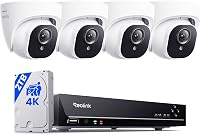
This ANNKE DVR fits buyers who want 3K cameras and built-in microphones in a coaxial camera system. Consider the included camera count and cable routes alongside its image and lighting features.
NVR vs DVR: which recorder should you buy?
Buy an NVR if you want compatible IP cameras, especially a PoE kit; buy a DVR if compatible coaxial cameras fit your home or existing wiring. Compare each kit's cameras, channels, storage and cable routes before choosing.
The Reolink option suits a PoE installation with 4 cameras and a 2TB drive. The ANNKE choices suit wired DVR installations, with one including 8 cameras and the other 4 higher-resolution cameras.
If you still need to decide whether local or remote recording fits your needs, compare cloud and local camera storage next.
Frequently asked questions
What is the main difference between an NVR and a DVR?
An NVR records video from IP cameras over a network connection, while a DVR records video from analog cameras connected by coaxial cable. The camera and recorder must be compatible, so check the kit's connection type before planning a new system or replacing a recorder.
Is an NVR better than a DVR for home security?
An NVR can be the better fit for a new PoE camera installation, while a DVR can suit a home with compatible coaxial cameras. Neither recorder is automatically better for every house.
Compare the cameras, cable routes, features and replacement needs together.
Can you use existing cameras with a new recorder?
Sometimes, but the camera type and recorder must support the same connection and video format. A DVR may support several analog formats, while an NVR kit may be limited to compatible IP cameras.
Identify the camera model and connection before buying a recorder.
Does an NVR or DVR need the internet to record?
Local recording can continue without internet on some systems. ANNKE says its DVR records to an inserted hard drive without internet, while remote viewing and playback may need an internet connection.
Check the exact system's instructions for what stays available offline.
Should you choose PoE or coaxial cameras?
Choose PoE if you want IP cameras that carry power and network data over Ethernet to a compatible NVR. Choose coaxial cameras if you want an analog DVR setup or have suitable coax cable already.
Map the cable route and verify recorder support before deciding.