eufyCam C37 4-Cam Kit Review: Worth It? (October 2026)
The eufyCam C37 4-Cam Kit suits homes that want solar-powered cameras with pan and tilt, color night vision and local storage. Its main limits are no 24/7 recording, a required HomeBase Mini or compatible HomeBase 3, and no HomeKit support.
On this page (7 sections)
- What does the eufyCam C37 4-Cam Kit include?
- How well do the C37's camera and night features fit your property?
- What should you know about solar charging and placement?
- How do local storage and app features work?
- What are the C37's compatibility limits?
- Is the eufyCam C37 a better fit than the C35 or aosu kits?
- Who should choose the eufyCam C37?
The eufyCam C37 4-Cam Kit suits homes that want four solar-powered cameras with pan and tilt, auto-tracking, color night vision and local storage. Its trade-offs are no 24/7 recording, a required compatible HomeBase and no HomeKit support.
The main buying question is whether you want a camera to follow movement and place each solar panel separately from its camera. The C37 combines those features, but it isn't a fit for continuous recording.
What does the eufyCam C37 4-Cam Kit include?
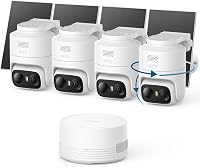
The kit includes four outdoor C37 cameras, four detachable solar panels and a HomeBase Mini. The base has local storage for footage from this multi-camera setup.
eufyCam C37 4-Cam Kit: Best for adjustable solar coverage

- Four 2K cameras
- 360° pan and tilt with auto-tracking
- Four detachable 3W solar panels
- HomeBase Mini with 64GB storage
A four-camera kit for buyers who want pan-and-tilt views, detachable solar panels and local storage. It requires HomeBase Mini or a compatible HomeBase 3, and it doesn't record continuously.
Pros
- Pan and tilt with auto-tracking
- Solar panels can be positioned apart from cameras
- HomeBase Mini includes 64GB local storage
- No monthly fee is required
Cons
- No 24/7 continuous recording
- Not compatible with HomeBase 2 or HomeKit
- HomeBase Mini storage expansion needs a separate microSD card
Each C37 connects over 2.4GHz Wi-Fi, while the HomeBase Mini provides 64GB of built-in storage. You can expand the base up to 1TB with a separate microSD card.
The cameras have 2K resolution and a spotlight for color night vision. Pan and tilt let them cover a wider area than a fixed view, and auto-tracking can keep a moving subject centered.
What stands out in this eufy C37 review?
The strongest fit is adjustable coverage with solar charging. A detachable panel lets you choose a camera angle for the view and a separate position for sunlight.
The key limitation is recording style. The C37 doesn't record continuously, so it may not suit a driveway or another area where you want footage from every minute, including quiet periods.
How well do the C37's camera and night features fit your property?
The C37 is a better match for open areas where a camera can pan and tilt to follow movement. Fixed cameras may be enough for a narrow doorway or a single approach.
The 2K image and spotlight support full-color night vision. The camera can also use infrared light, but the spotlight is part of its color night view.
The 360° pan-and-tilt feature can help cover more of an area from one mounting position. It doesn't mean every angle is visible at once, so check the camera's view and mounting location for corners or obstructions.
For a dark yard, compare the C37 with other options in our guide to best night vision security camera systems. For a wider overview of kit types and coverage needs, see how to pick a home security camera system.
What should you know about solar charging and placement?
The detachable panels give you more freedom to choose the camera view and panel position separately. Mount each panel where it can receive sunlight, then aim the camera at the area you want covered.
Solar charging depends on sunlight, angle and weather. Frequent camera activity can also use power faster than solar input replenishes it, so a panel doesn't guarantee the battery will never drop.
The C37 is designed for upside-down installation. Its installation guidance warns that upright or flat placement may cause water damage or poor detection, so use the specified orientation and follow the mounting instructions.
If you need cameras with no solar panel, compare the best battery security camera systems. That guide can help if flexible placement matters more than solar charging.
How do local storage and app features work?
The included HomeBase Mini stores footage locally, with 64GB built in and expansion up to 1TB via microSD. The microSD card is sold separately.
With HomeBase Mini, the C37 supports human, vehicle, pet and facial recognition, along with cross-camera tracking. These features require the eufy app and a compatible base.
A local base may suit you if you prefer footage stored at home and want to avoid a required cloud subscription. For a broader look at the trade-offs, read cloud vs local storage for security camera video.
What are the C37's compatibility limits?
The C37 works with HomeBase Mini or HomeBase 3, but not HomeBase 2. HomeBase 3 needs version 3.7.8.4 or newer, and HomeBase Mini needs version 4.0.5.6 or newer.
It also does not support Apple Home or HomeKit. Check those limits if you already own eufy equipment or want camera controls tied to an Apple home setup.
The eufy app must be version 6.0.10 or newer for smooth operation. Update the app and confirm the base firmware before setup.
Is the eufyCam C37 a better fit than the C35 or aosu kits?
The C37 is the most direct choice here if you want pan and tilt plus separately positioned solar panels. The other kits suit different priorities, such as flexible mounting, integrated solar or a larger camera count.
The eufyCam C35 offers magnetic mounting and color night vision without a spotlight. It supports indoor and outdoor use, but its listed features don't describe pan and tilt.
The aosu D1 Classic also has pan, tilt and auto-tracking, plus an integrated solar panel and 32GB local storage. Its panel can't be moved separately from the camera, and its live view is available in the app only.
The six-camera aosu battery kit is useful if you want more camera positions and don't need solar panels. Its cameras are battery-powered, with 2K video and up to 6X zoom.
For a brand-level comparison, see aosu vs eufy. If you want to compare eufy with another wire-free brand, read eufy vs Blink.
Who should choose the eufyCam C37?
Choose the C37 if you want four outdoor cameras that can pan and tilt, local storage and solar panels you can position separately. It is a weaker match if continuous recording or HomeKit support is essential.
The C35 fits better if magnetic or flat-surface mounting is your priority. Choose the aosu D1 Classic if an integrated solar panel and four-camera live view in one app suit your setup.
If you need six camera positions and battery power, consider the aosu 2K Battery 6-Cam Kit. Before deciding, match your camera count, recording needs and base compatibility to the areas you plan to cover.
Frequently asked questions
Does the eufyCam C37 record continuously?
No. The C37 does not support 24/7 continuous recording, even when connected to HomeBase Mini.
It records activity-based events instead, so consider whether clips meet your needs before choosing it for a location where you want an uninterrupted timeline.
Does the eufyCam C37 need a HomeBase?
Yes. The C37 works with HomeBase Mini or HomeBase 3 running version 3.7.8.4 or newer.
It isn't compatible with HomeBase 2, so check the base included in the kit and any other eufy equipment you plan to connect.
Can you move the C37 solar panel away from its camera?
Yes. Each camera has a detachable 3W solar panel, so you can aim the camera toward the area you want to view and place its panel where sunlight is better.
Charging can still vary with sunlight, panel angle, weather and camera activity.
Does the eufyCam C37 work with Apple HomeKit?
No. The C37 does not support HomeKit.
It connects over Wi-Fi and is controlled through the eufy app, so check your preferred smart home setup before choosing it.