aosu vs eufy: Which Camera Kit Suits Your Home? (October 2026)
Choose the aosu D1 Classic for built-in solar panels and 32GB of event storage, the eufy C37 for separately placed solar panels and 64GB in its HomeBase Mini, or the E42 for 4K video and expanded storage.
On this page (8 sections)
- aosu vs eufy: which camera kit fits your home?
- How do aosu and eufy handle local storage?
- Which kit is easier to install and position?
- Which camera has the right night view and tracking?
- Who should buy each aosu or eufy kit?
- What mistakes should you avoid with aosu vs eufy?
- How should you set up and care for these solar cameras?
- Which aosu vs eufy kit should you choose?
The eufy SoloCam E42 has 4K video, while the eufy C37 and aosu D1 Classic have 2K video. In this aosu vs eufy comparison, choose based on the solar-panel placement, local storage and recording pattern that suit your property.
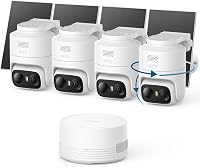
These are four-camera outdoor kits with pan and tilt, but the bases and setup differ. The aosu cameras use an included aosuBase, while the eufy kits pair with a HomeBase or supported local storage arrangement.


aosu vs eufy: which camera kit fits your home?
Choose the aosu D1 Classic when its integrated panels can face the sun, the eufy C37 when you need to place panels away from cameras, or the E42 when 4K detail is your priority. Start by checking each camera location for both a useful view and enough direct sunlight.
With the D1 Classic, the solar panel is part of each camera. That keeps the mount compact, but means the camera itself needs a sunny position. aosu says about 3 hours of direct sunlight daily helps keep a camera charged, and unobstructed sun improves charging.
The C37 and E42 have removable solar panels, so you can point a camera toward a gate or walkway and place its panel where sunlight is stronger. The C37 panels are 3W each. eufy says the E42's SolarPlus 2.0 system can stay charged with 2 hours of direct sunlight daily.
Solar charging still depends on the location and weather. If a camera gets shade for much of the day, compare the mounting options carefully and leave room to adjust the panel angle after installation.
How do aosu and eufy handle local storage?
The C37 includes 64GB in HomeBase Mini, the D1 Classic includes 32GB in aosuBase, and the E42 starts with 16GB in HomeBase 3. Expansion options and recording behavior matter as much as the starting capacity.
The D1 Classic records events when its cameras detect activity. aosu says its 32GB base can hold about 120 days of loop recording, but that estimate depends on activity and how clips are stored. The base connects to the router through Ethernet, while the cameras connect wirelessly to the base.
The C37's HomeBase Mini can expand to 1TB with a separately purchased microSD card. The E42's HomeBase 3 can expand to 16TB with a hard drive installed in the base.
For router storage with the E42, a microSD card is required.
Local storage avoids a cloud subscription for these options, but it doesn't mean setup is identical. Before buying, decide whether you want event clips and how much expansion you need.
Also consider where the base can sit near the router. For a wider explanation of recorder-based systems, see what an NVR system is and when you need one.
What does aosu vs eufy local storage mean day to day?
Both brands keep recordings on local storage, but aosu uses its dedicated base for event clips while eufy offers different base and storage arrangements. Your review habits can make one simpler than the other.
The aosu app can show four live camera views at once. The base has no HDMI or TV output, so this feature is for monitoring on a phone through the app.
The C37 uses HomeBase 3 or HomeBase Mini and does not support HomeBase 2 or Apple HomeKit. Its HomeBase Mini also supports connecting up to 10 cameras and offers recognition and cross-camera features.
The E42 works with a router or HomeBase 2 and HomeBase 3, according to its compatibility details. Continuous recording is supported only in specified setups: Direct Power Mode requires a 5V/2A adapter and compatible cable.
Router use requires a microSD card, and HomeBase 3 requires a hard drive installed in the base.
Which kit is easier to install and position?
The D1 Classic has the simplest panel mounting, while the C37 and E42 give you more freedom to place panels separately from cameras. Choose according to your walls, sun exposure and comfort with a base connected to the router.
For aosu, connect the base to the router's LAN port with the included Ethernet cable, then set up the pre-paired cameras in the app. The cameras connect to the base instead of directly to home Wi-Fi.
Mount them upright on exterior walls with the included screws.
For the C37 and E42, plan a camera position and a separate panel position for each unit. This gives you more flexibility if a doorway needs one viewing angle while the sun reaches another part of the wall.
Avoid placing a panel where a roof edge, tree or wall blocks most direct sunlight.
The C37 has a specific mounting requirement: eufy says it is designed for upside-down installation. Follow that orientation because upright or flat mounting may cause water damage or poor detection.
Update the eufy app to version 6.0.10 or newer for smooth C37 operation, and check that the HomeBase firmware meets its minimum version.
For all three kits, use the setup app before finalizing screw locations. Confirm that each view covers the approach you care about, the wireless connection reaches the base or router arrangement, and solar panels have a practical path to sunlight.
Which camera has the right night view and tracking?
The E42 delivers 4K video, while the C37 and D1 Classic provide 2K video with color night viewing. Choose based on the kind of detail you need and whether visible spotlights or infrared viewing better suits the area.
The D1 Classic offers up to 6x zoom, full-color night vision from its spotlights, and an infrared mode for black-and-white viewing without visible lighting. Its cameras can pan, tilt and track detected people and other movement.
The C37 adds a spotlight for color night vision and tracking for people, vehicles and pets. With HomeBase Mini, it also supports cross-camera tracking and recognition features, which can help connect activity as it moves among cameras.
The E42 combines 4K video with AI detection and tracking for people, vehicles or important events. It also has a motion-activated strobe light and siren.
These deterrent features may suit a visible driveway or entry, while a quieter side yard may call for a different lighting choice.
Resolution is only one part of useful coverage. Aim the camera at the area where you need detail, and avoid expecting a wide scene to show the same fine detail as a closer view.
Who should buy each aosu or eufy kit?
Buy the aosu D1 Classic for integrated solar mounting and four-feed app viewing, the C37 for flexible solar placement and a larger starting storage capacity, or the E42 for 4K video and substantial storage expansion. Each system suits a different installation and recording preference.
The aosu kit is a strong fit if all four locations receive direct sun and you want a pre-paired system with one base. It may not suit you if the cameras must connect directly to your home Wi-Fi, if you need TV output, or if you want continuous recording.
The C37 suits a home where panel placement needs to differ from camera placement. It also fits a buyer who wants HomeBase Mini features and room to add more cameras.
Skip it if you need 24/7 recording, HomeBase 2, or Apple HomeKit compatibility.
The E42 is the choice for a buyer who wants 4K detail and room to expand storage through HomeBase 3. It may be a poor fit if you want a simple event-only setup with no storage decisions, since its continuous recording options require compatible power and storage components.
If you are comparing wireless battery options beyond these three kits, our guide to battery security camera systems with no wires explains the broader category. For another brand comparison, see eufy vs Blink.
What mistakes should you avoid with aosu vs eufy?
The most common buying mistakes are overlooking the base requirements, mounting a solar panel in shade, and assuming every camera records continuously. Check those details before ordering or drilling.
First, don't confuse local storage capacity with recording duration. A busy driveway can generate more event clips than a quiet side entrance, so storage may fill at different rates.
The D1 Classic uses loop recording for events, while the C37 does not support continuous recording.
Second, don't place a solar panel based only on the camera's ideal viewing angle. With the C37 and E42, use their removable panels to find a sunnier position.
With aosu, you need a sunny camera location because the panel is built in.
Third, check compatibility before relying on a hub you already own. The C37 requires HomeBase 3 or HomeBase Mini and does not support HomeBase 2.
Check required app and base software versions during setup.
Finally, don't assume an app-based live view will appear on a television. The aosu base has no HDMI output, and the C37 is designed for smartphone app control.
If TV viewing is essential, verify that capability before choosing a camera system.
How should you set up and care for these solar cameras?
Place each camera for a clear view, direct sunlight and a reliable connection to its base or router. A short placement check before mounting can prevent weak charging and missed coverage.
Start by marking the likely camera views on a simple sketch of the house. Include gates, doors, driveways and paths, then check whether each camera can cover the approach without pointing at a wall or an obstruction.
For the C37 and E42, install the camera where the view works and set the solar panel where sunlight is stronger. For the D1 Classic, choose the camera location with sunlight in mind because the panel is integrated.
Recheck panel position after installation if charging seems low, since shade and weather affect solar input.
Keep the lens and panel clear of leaves, dust and cobwebs as part of ordinary outdoor upkeep. Check app alerts after setup, adjust detection areas or sensitivity if available, and review whether notifications reflect activity you actually need to see.
Before relying on a camera for an important area, open live view from the usual place you check alerts. Confirm that the image, connection and event clips are available, then revisit placement if a camera misses the path or the solar panel stays shaded.
Which aosu vs eufy kit should you choose?
Choose aosu if integrated solar panels and four simultaneous app views match your setup, eufy C37 if flexible panel placement and HomeBase Mini fit better, or eufy E42 if 4K and expandable storage lead your priorities. Mark the camera views and sun exposure first, then confirm the base, app and recording requirements for your preferred kit.
If you need continuous recording, review the E42's specific power and storage requirements before buying. For event-based monitoring, pick the base and solar layout that will be easiest to install and maintain at your home.
Frequently asked questions
Is aosu or eufy better for a wireless camera kit?
The aosu D1 Classic fits a setup where direct sunlight reaches each camera and you want one app screen for four live feeds. The eufy C37 is a better fit when the camera and solar panel need separate positions.
Choose the E42 when 4K resolution and expanded HomeBase storage matter more.
Do the aosu D1 Classic and eufy C37 record all the time?
No. The aosu D1 Classic stores event based recordings, and the eufy C37 does not support 24/7 continuous recording, even with HomeBase Mini.
The E42 supports continuous recording only with specific power and storage arrangements, so confirm those needs before choosing it.
Can I watch these camera feeds on a TV?
The aosu D1 Classic offers live view through its app, and its base has no HDMI or TV output. The C37 is app controlled and lists a smartphone as a compatible device.
Plan to check both systems from a phone rather than expecting a direct TV connection.
Which kit has more local storage?
The C37 starts with 64GB in its HomeBase Mini and can expand to 1TB with a microSD card. The aosu D1 Classic has 32GB in aosuBase.
The E42 includes HomeBase 3 with 16GB and supports expansion up to 16TB with a hard drive.