eufy vs Blink: Which Outdoor Camera System Is Better? (October 2026)
Choose eufy for pan-and-tilt coverage, solar charging and included local storage; choose Blink for a longer hub connection and 6 cameras. The right eufy vs Blink system depends on camera locations, charging and how you want to save clips.
On this page (9 sections)
- Eufy vs Blink: which camera system fits your yard?
- Which system reaches farther from its hub?
- How do eufy and Blink handle power?
- Where does each system store video?
- Which system gives you more useful night coverage?
- Which eufy alternative suits mixed indoor and outdoor use?
- What should you check before setting up eufy or Blink?
- What common buying mistakes should you avoid?
- Which outdoor camera system should you choose?
Choose eufy for pan-and-tilt coverage, solar charging and included local storage; choose Blink for longer hub range and a 6-camera kit. This eufy vs Blink comparison helps you match each system to your yard, mounting options and clip-storage preferences.
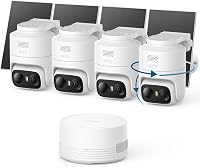
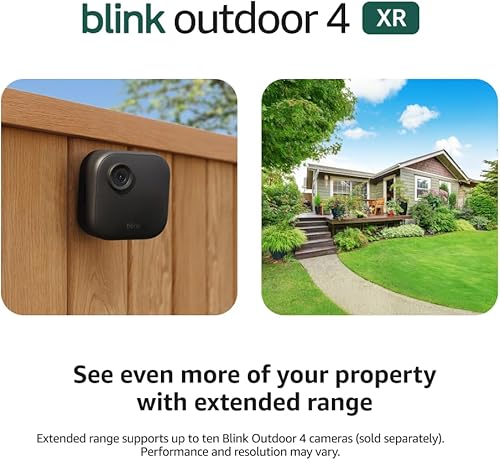
The eufyCam C37 kit has 4 cameras, detachable solar panels and HomeBase Mini with 64GB of built-in storage. Blink Outdoor 4 XR has 6 cameras and a Sync Module XR, with local storage available through a separate microSD card.

Eufy vs Blink: which camera system fits your yard?
Choose eufy when you want a camera that can pan and tilt; choose Blink when cameras need a longer connection to their hub. Start with the parts of your property you need to see, then compare how each system can reach and power those locations.
The C37’s 360° pan and tilt with auto tracking can follow activity within its view. Blink’s XR system is designed to extend the connection between cameras and the Sync Module XR, which helps when cameras sit farther from the hub.
A camera that moves can cover a changing scene, but it still needs a useful mounting position and clear view. A long-range connection helps only if the planned camera route is workable at your property, so sketch camera and hub locations before buying.
If you’re choosing a complete setup for the first time, our guide to home security camera systems explains how to match a kit to your layout. For a mostly wireless approach, compare the options in our battery security camera systems guide.
How many cameras do you need in an eufy vs Blink setup?
Blink includes 6 cameras, while the C37 and C35 kits include 4 each. Count the doors, paths and outdoor areas you want to monitor before deciding whether the extra two cameras would be useful.
More cameras can make it easier to cover separate approaches, but count alone doesn’t guarantee a clear view of each one. Check mounting spots, angles, obstructions and how you’ll get to each camera for care.
Don’t plan to cover every part of the yard with one moving camera just because it can pan. A front door, side path and back gate may each need a view that stays aimed at that area.
Which system reaches farther from its hub?
Blink XR is the stronger fit when cameras need a long connection to the hub. Its stated reach is up to 1,000 feet in open air or 400 feet in typical use.
Treat those as different conditions, not interchangeable promises. Use 400 feet as the more useful planning figure, then account for walls, building materials and the route between each camera and the module.
The C37 connects over 2.4 GHz Wi-Fi and requires HomeBase 3 or HomeBase Mini. Check the Wi-Fi coverage and hub location near your planned camera spots before settling on either system.
What does Blink XR range mean for a property?
Plan around the typical-use range and your actual camera route. Blink says the XR band avoids typical Wi-Fi congestion and offers quicker live-view access and fewer disconnects than its cameras operating on Wi-Fi alone.
These are system claims; conditions at a particular home can differ. An unobstructed yard and a route through several walls present different connection challenges.
Mark possible camera positions on a simple property sketch. Add the Sync Module XR location and note buildings or walls between it and each camera, then consider whether the typical-use distance suits the layout.
Skip the XR system if its connection path doesn’t fit your property or if you don’t need its extended range. Extra reach matters most when it solves a real placement problem.
How do eufy and Blink handle power?
Choose the C37 if you can put its solar panels in sun; choose Blink if you prefer the included AA batteries. Each approach calls for a different check before installation.
The C37 kit includes a detachable 3W solar panel for each camera. You can point a camera toward the area you want to watch while placing its panel where it gets better sunlight.
Blink includes 12 Energizer Lithium AA batteries for its 6 cameras. Blink states up to 2 years of battery life when the cameras use the Sync Module XR and those batteries.
Solar charging varies with sunlight, panel angle and weather. Frequent event triggers or low solar input can still reduce battery charge, so look at each panel’s likely sun exposure rather than assuming the battery will always stay full.
For either system, choose mounting spots you can reach when you need to adjust, clean or service a camera. Avoid choosing a location only because it offers a wide view if the panel or camera will be difficult to access.
Where does each system store video?
The C37 includes local storage; Blink supports local storage with a separate microSD card and also offers cloud storage through a subscription trial. Decide where you want clips saved before choosing a system.
HomeBase Mini includes 64GB of built-in storage and supports expansion up to 1TB with a microSD card sold separately. The C37 does not support 24/7 continuous recording, so it may not suit a plan that depends on nonstop recording.
The Blink Sync Module XR supports a microSD card up to 256GB, sold separately. Blink also offers cloud storage through a free 30-day subscription trial.
Think about whether you prefer storage in the home or cloud access, and whether buying a separate card is part of your setup. Our guide to cloud vs local camera storage lays out the tradeoffs, while what an NVR system is explains a different approach to recording across a property.
Which system gives you more useful night coverage?
The C37 offers 2K color night vision with a spotlight. Its built-in light illuminates the scene after dark, which can suit a camera position where visible lighting is acceptable.
The C35 offers color night vision without a spotlight, a useful distinction for locations where visible light is unwanted. Blink’s night vision features aren’t specified here, so check those capabilities before choosing Blink if low-light performance is a deciding factor.
Think about the view you need at each spot: a lit doorway, a dark side path and a driveway may call for different night coverage. Consider whether you want color detail, added light or a camera that doesn’t use a spotlight.
For more help with low-light choices, see our guide to night vision security camera systems. If you’re comparing camera details, our guide to home camera resolution explains how resolution fits into the overall viewing setup.
Which eufy alternative suits mixed indoor and outdoor use?
The eufyCam C35 is worth considering when flexible mounting and spotlight-free color night vision matter more than solar panels or pan-and-tilt movement. It can be used indoors or outdoors.
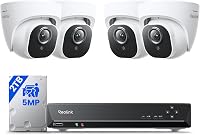
Its magnetic base attaches to metal, and it can also sit on a flat surface or use screw mounting. The kit includes HomeBase Mini for local storage and AI features, and each camera supports a separate microSD card.
Skip the C35 if solar panels or 360° pan and tilt are central to your plan. It doesn’t include a solar panel and isn’t compatible with HomeBase 2.
For another brand comparison focused on compact camera kits, read our AOSU vs eufy camera comparison.
What should you check before setting up eufy or Blink?
Confirm hub, app, network and mounting requirements before installing cameras. A compatibility or placement mismatch can affect your setup even when the kit’s main features look right.
The C37 works with HomeBase 3 at firmware version 3.7.8.4 or newer, or HomeBase Mini at version 4.0.5.6 or newer. It doesn’t support HomeBase 2 or HomeKit, and smooth operation requires eufy App version 6.0.10 or newer.
The C35 also doesn’t work with HomeBase 2. Blink’s XR cameras use the included Sync Module XR, and saving clips locally requires a separate microSD card.
Before mounting, place the hub where it can connect to your network and where its camera links make sense. Check the camera’s view from the intended position, confirm access to sunlight for C37 panels, and make sure you can reach equipment for future adjustments.
Our guide on how home security camera systems work covers the roles of cameras, hubs and recording devices. If you’re adding a camera to an existing eufy setup, confirm compatibility and required firmware first.
What common buying mistakes should you avoid?
The most common mistake is choosing by camera count or range claims without mapping the property. A kit’s headline feature helps only when it fits the camera locations you actually need.
Don’t assume Blink’s open-air reach will match the typical-use figure at a home with walls and other obstructions. Plan the route from each camera to the Sync Module XR, and use the 400-foot typical-use figure as your starting point.
Don’t assume solar power means no battery changes or attention under every condition. Sunlight, panel angle, weather and frequent events can affect charging, so pick spots with practical panel exposure.
Don’t buy the C37 for nonstop recording: it doesn’t support 24/7 continuous recording. And don’t count on HomeBase 2, HomeKit or an unupdated app for C37 compatibility.
Which outdoor camera system should you choose?
Choose the eufy C37 for solar panel flexibility, 360° pan and tilt, 2K color night vision and included local storage. Choose Blink Outdoor 4 XR for a 6-camera set and longer hub range.
Pick the C35 if you want flexible indoor and outdoor mounting with color night vision that doesn’t use a spotlight. Skip it if you need included solar panels, pan-and-tilt coverage or HomeBase 2 compatibility.
For the C37’s features and limits, read the eufyCam C37 4-Cam Kit review. If camera distance is your deciding factor, our Blink Outdoor 4 XR review covers that system.
Frequently asked questions
Is eufy better than Blink for outdoor cameras?
Eufy suits buyers who want solar panels, pan-and-tilt views and included local storage in the C37 kit. Blink suits properties where cameras need a longer connection to the hub or where 6 cameras are useful.
Does the eufyCam C37 record all the time?
No. The C37 does not support 24/7 continuous recording, including when connected to HomeBase Mini.
It records events, so consider whether event footage fits your needs before choosing it for a location where continuous coverage is important.
Does Blink Outdoor 4 XR need Wi-Fi?
Blink Outdoor 4 XR connects its cameras to the included Sync Module XR over the XR band. Its stated range is up to 1,000 feet in open air or 400 feet in typical use, so plan around the typical-use distance and the route across your property.
Can you store Blink Outdoor 4 XR footage locally?
Yes. The Sync Module XR supports local storage with a microSD card up to 256GB, sold separately.
The system also offers cloud storage through a free 30-day subscription trial, so decide where you want clips kept and whether you need to buy a card.
Can eufy C37 and C35 use the same HomeBase?
Both kits include HomeBase Mini, and the C37 also works with HomeBase 3 at the required firmware version. Neither C37 nor C35 is compatible with HomeBase 2.