7 Best Battery Security Camera Systems With No Wires (October 2026)
The best wireless battery security camera systems include the aosu 2K Battery 6-Cam Kit for multi-area coverage, the Arlo Pro 6th Gen 2K 4-Cam Kit for wide yard views, and the Blink Outdoor 4 XR 6-Camera System for distant camera spots.
On this page (5 sections)
The aosu 2K Battery 6-Cam Kit is the best wireless battery security camera system for covering several areas, with six cameras, local storage and a hub-based connection. Blink Outdoor 4 XR suits distant camera spots, while Arlo Pro offers a wide view and rechargeable, swappable batteries.
Battery cameras fit places where outlets or cable runs are inconvenient. They still need a plan for recharging, network coverage and clip storage.
For a broader look at power choices, read our guide to how security cameras are powered. If you want a camera that can supplement its battery with sunlight, see our guide to the best solar powered camera systems.
Our picks at a glance
-
1

-
2

-
3
Which wireless battery security camera system fits your home?
The aosu 6-Cam Kit leads this roundup with a score of 8.6. The picks below follow the site scores, from highest to lowest.
aosu 2K Battery 6-Cam Kit: Best for multi-area coverage
- Six battery-powered cameras
- 2K video and up to 6X zoom
- Pre-installed 32GB local storage, expandable to 1TB
- Event-based recording
Six wire-free cameras pair with a hub that connects to your router by Ethernet. Local storage and event recording suit buyers who want to review motion clips without a required subscription.
Pros
- Six cameras in one kit
- Local storage included
- Cameras connect to the base over a dedicated wireless link
Cons
- Base needs an Ethernet connection to the router
- Does not record continuously
The aosu 2K Battery 6-Cam Kit includes six compact cameras and a base with local storage. The battery-powered cameras connect to aosuBase over its dedicated wireless link, while the base connects to your router by Ethernet.
The base comes with a pre-installed 32GB memory card, and storage can expand to 1TB with a separate microSD card. The system records events rather than inactive hours.
PIR plus AI human detection focuses alerts on people, though detection varies with placement, distance, lighting and settings. You can view up to four cameras at once in the app, and camera-to-camera tracking groups the same person across cameras into one timeline.
Choose this kit if you want six battery cameras and local storage without a required subscription. Plan an Ethernet connection for the base, and remember that event recording does not provide continuous footage.
Arlo Pro 6th Gen 2K 4-Cam Kit: Best for wide yard views
- 2K HDR video
- 160° field of view
- Rechargeable, swappable battery
- Live streaming and basic alerts without a subscription
A 160° field of view and swappable rechargeable batteries make this four-camera kit a flexible choice for entry points and yard areas. Advanced detection and video history require a paid Arlo Secure plan after the trial.
Pros
- Wide 160° field of view
- Swappable rechargeable battery
- Works with several smart-home platforms
Cons
- Paid plan required for advanced features after trial
- Functionality may be limited outside the U.S.
Arlo Pro suits homes where each camera needs a broad view across a doorway, yard or driveway. Its 2K HDR video and 160° field of view give it a wide stated coverage angle.
The rechargeable battery is designed to be swapped or recharged. Arlo also lists color night vision, a spotlight, two-way audio, motion tracking and remote siren control among its features.
Live streaming and basic alerts work without a subscription. Arlo Secure features such as 60-day video history and advanced detection require a paid plan after the trial, so decide whether those features fit your needs.
Pick it for flexible placement and a wide view, especially when you want a rechargeable battery you can remove. Review the plan terms for advanced features before relying on saved clips or enhanced alerts.
Blink Outdoor 4 XR 6-Camera System: Best for distant camera spots
- Six cameras and Sync Module XR
- Up to 1,000 ft open-air range or 400 ft typical use
- Up to two years of battery life with included Energizer lithium AA batteries
- Local storage supported with a separate microSD card
The Sync Module XR is designed to extend camera range beyond Wi-Fi alone. Blink says the included batteries can last up to two years with the module, though actual life depends on use.
Pros
- Six cameras included
- Extended range with Sync Module XR
- Cloud trial and optional local storage
Cons
- MicroSD card sold separately
- Battery-life figure is a stated maximum
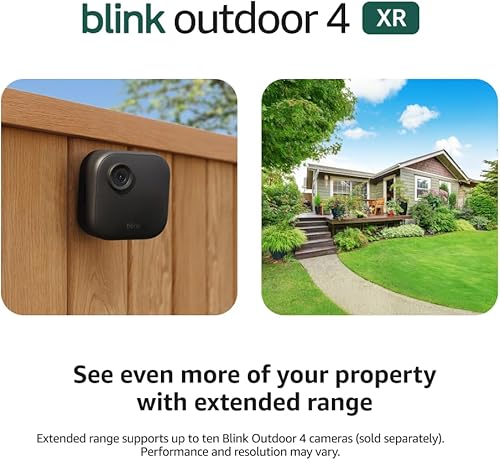
Blink Outdoor 4 XR suits camera placements that sit far from the system hub. With the Sync Module XR, its range is up to 1,000 ft in open air or 400 ft in typical use.
Blink says the XR connection can provide faster live view and fewer disconnects than cameras operating on Wi-Fi alone. The stated battery life is up to two years when used with the included Energizer lithium AA batteries and Sync Module XR.
For storage, you can use cloud service with a free 30-day trial or add a microSD card up to 256GB for local storage. The card is sold separately.
Choose Blink when range is the deciding factor and you can place the module where it reaches your cameras. Its battery-life figure is a maximum claim, and actual life depends on use.
aosu 2K QHD Battery 4-Cam Kit: Best for wide fixed coverage

- Four battery-powered cameras
- 166° fixed viewing angle
- 32GB local storage in the hub
- Solar panel can be added
This four-camera kit combines a wide fixed view with hub-based local storage. The battery-life estimate is up to 240 days per charge under stated lab conditions, so placement and activity levels matter.
Pros
- Wide 166° fixed view
- Local storage included
- Solar panel can be added
Cons
- Event-based recording only
- Battery life varies with use
The aosu 2K QHD Battery 4-Cam Kit suits a smaller setup where each camera needs a broad, fixed view. Its 166° lens is wide, and the included base has local storage.
The cameras record only when motion is detected. aosu estimates up to 240 days of battery life per charge using lab conditions of 40 events per day and 10 seconds per recording, so heavier activity and longer clips can shorten that interval.
The base connects to the router by Ethernet, while cameras receive their signal from the base. You can add a solar panel to a camera later, which may suit a sunny position where regular charging is inconvenient.
Choose this kit for wide fixed coverage and included local storage across four cameras. Read our guide to whether solar security cameras are any good if you're weighing whether a panel suits your location.
eufyCam C35 4-Cam Kit: Best for flexible mounting

- Four cameras with magnetic mounting
- Local storage through HomeBase Mini or camera microSD
- HomeBase Mini expandable up to 1TB
- 2.4GHz Wi-Fi
Magnetic bases can attach to metal surfaces, and the cameras can also sit on flat surfaces or use screw mounts. The kit includes a HomeBase Mini for central storage, but the cameras themselves have no built-in storage.
Pros
- Flexible mounting options
- Local storage without a mandatory subscription
- HomeBase Mini supports cross-camera tracking
Cons
- HomeBase Mini has 8GB eMMC before expansion
- Not compatible with HomeBase 2
eufyCam C35 stands out for mounting flexibility. Its magnetic base can attach to a metal surface, and the cameras can also sit on a flat surface or use screw mounts.
The included HomeBase Mini stores footage locally and can expand up to 1TB. Each camera also supports a separate microSD card up to 256GB, but C35 cameras have no built-in storage.
The system supports features such as facial recognition and cross-camera tracking through HomeBase Mini. It uses 2.4GHz Wi-Fi, and eufy says the C35 is not compatible with HomeBase 2.
Pick this kit if you may move cameras or want more than one mounting style. Check that your planned positions have suitable Wi-Fi coverage and use the 5V/2A power adapter for HomeBase Mini.
Arlo Essential 2K 3-Cam Kit: Best for three-camera plans

- Three rechargeable wireless cameras
- 2K video and 130° field of view
- Dual-band Wi-Fi
- Live streaming and basic alerts without a subscription
This three-camera kit suits a smaller coverage plan with 2K video and dual-band Wi-Fi. A paid Arlo Secure plan is required for advanced features after the included trial.
Pros
- Three cameras for a smaller setup
- Rechargeable wireless design
- Works with Alexa, Google Home and other platforms
Cons
- Advanced features require a paid plan after trial
- Field of view is narrower than the Arlo Pro kit
Arlo Essential is a three-camera option for buyers who want 2K video and dual-band Wi-Fi. Its 130° field of view is narrower than the Pro kit's, so consider it for individual doors or smaller areas.
The cameras are rechargeable and wire-free to install. Features include color night vision, a spotlight, two-way audio and a siren, while the app provides live video and motion alerts.
As with the Pro kit, advanced features such as 60-day video history require a paid Arlo Secure plan after the trial. Basic alerts and live streaming work without a subscription.
Choose Essential if three cameras cover your plan and you want dual-band Wi-Fi. Consider the Pro kit if you need a wider stated field of view or swappable batteries.
GMK 2K Wireless 4-Cam System: Best for plug-in flexibility

- Four rechargeable cameras
- 2K video with color night vision and infrared modes
- Local microSD storage up to 128GB
- Supports optional constant plug-in power
The cameras can run on battery or use constant plug-in power at a busy location. This kit uses 2.4GHz Wi-Fi and does not support continuous recording.
Pros
- Battery or plug-in power options
- Local microSD storage supported
- Two-way talk and motion alerts
Cons
- Does not support 5GHz Wi-Fi
- No 24/7 continuous recording
GMK gives you the option to use battery power in remote spots or constant plug-in power in busy locations. That can reduce the need to recharge a camera mounted where motion triggers are frequent, provided an outlet is available.
The four cameras offer 2K video, color night vision and infrared modes, plus two-way talk and motion alerts. GMK supports 2.4GHz Wi-Fi only, local microSD storage up to 128GB or cloud storage, and no continuous recording.
The system includes a privacy sleep mode and scheduled sleep options. Set the schedule around when you need alerts, since sleep mode pauses monitoring.
Choose GMK when plug-in power is useful at some locations and battery placement is useful at others. Check Wi-Fi coverage at each mounting point and plan for a microSD card if you want local video.
What should you check before choosing a battery camera kit?
Choose a system by its power routine, recording style, storage plan and connection path. A wire-free camera still depends on a working link to its hub or router.
| Product | Best for | Camera count | Storage | Recording | Our score |
|---|---|---|---|---|---|
| aosu 2K Battery 6-Cam Kit | multi-area coverage | 6 | 32GB included; expandable to 1TB with microSD | Event-based | 8.6 |
| Arlo Pro 6th Gen 2K 4-Cam Kit | wide yard views | 4 | 8.5 | ||
| Blink Outdoor 4 XR 6-Camera System | distant camera spots | 6 | 8.4 | ||
| aosu 2K QHD Battery 4-Cam Kit | wide fixed coverage | 4 | 32GB local storage | 8.3 | |
| eufyCam C35 4-Cam Kit | flexible mounting | 4 | HomeBase Mini or microSD up to 256GB per camera | 8.2 | |
| Arlo Essential 2K 3-Cam Kit | three-camera plans | 3 | 7.9 | ||
| GMK 2K Wireless 4-Cam System | plug-in flexibility | 4 | microSD up to 128GB or cloud | 7.2 |
How much camera coverage do you need?
Camera count matters, but placement matters just as much. Six cameras can cover more points than four, while a wide fixed lens may cover a larger area from one mounting spot.
Map doors, driveways, gates and yard approaches before picking a kit. For cameras watching different sides of a house, check for walls or outbuildings that may affect wireless range.
Think through the view from each mount, not just the number of cameras in the box. A broad fixed view can suit an open yard, while a narrower view may be easier to aim at one doorway or package area.
Does the system record continuously or only on motion?
Many battery kits in this roundup record motion events rather than continuous video. Both aosu systems and GMK specify event-based recording or no 24/7 recording.
That can conserve battery and storage, but it may not suit a use case where you need every moment recorded. If continuous recording is a priority, review wireless camera systems that record to an NVR and compare their power needs.
How will you store and review clips?
Local storage can avoid a mandatory ongoing plan, but capacity and included hardware differ. The aosu kits include storage in their base, while eufyCam C35 offers HomeBase Mini storage or separate microSD cards.
Blink supports local storage through a separate microSD card, and Arlo's advanced history features require a paid plan after the included trial. Check whether you need to buy a card or pay for cloud service before choosing.
For more on storage tradeoffs, our guide to cloud vs local storage for security camera video explains how each approach affects access and retention.
How often will you need to recharge?
Battery life depends on how often a camera detects motion, how long clips run and how much live view you use. Stated maximum estimates aren't a guarantee for a busy entryway or a camera that's checked often.
A swappable battery can reduce downtime if you keep a charged spare ready. Solar add-ons may suit sunny locations, while a constant plug-in option can work at a high-traffic spot near an outlet.
Choose a mounting height and position that you can safely reach for charging or maintenance. If you don't want that routine, consider whether a wired or solar-assisted setup better fits the location.
How do you set up a wireless battery security camera system?
Set up the hub or network connection first, then test each camera from its planned location before fixing its mount in place. A short check can reveal a weak signal, blocked view or inconvenient charging position.
For aosu, connect the base to your router with Ethernet, then pair the cameras to the base. For a direct Wi-Fi kit, check whether the model needs 2.4GHz, dual-band Wi-Fi or a separate module, and confirm the signal reaches each mounting spot.
Charge the cameras before installation and add storage before relying on recorded clips. With eufyCam C35, use the included 5V/2A adapter for HomeBase Mini; if you add a microSD card, power the device off before inserting or removing it and format the card before use.
Start with temporary placements and review the live view in daylight and after dark. Aim to cover the approach to a door or gate while avoiding trees, roads or other moving areas that could create unnecessary alerts.
What setup mistakes can cause missed alerts?
Mounting before checking the live view is a common mistake. A camera can end up aimed too high, blocked by an eave, or facing a busy area that triggers repeated notifications.
Don't assume every camera connects to the home router in the same way. Hub-based systems need a good router-to-base connection, while direct Wi-Fi models need signal at the camera itself.
Set motion zones and alert types after confirming the camera view. Review notifications during the first few days and adjust placement or sensitivity settings if routine movement creates too many alerts.
How should you care for battery cameras?
Keep the lens clear, check mounts periodically and plan charging around each camera's activity level. A shaded, reachable mount can make upkeep easier than placing a camera high in a hard-to-access corner.
Clean the lens gently with a soft cloth when dust, rain spots or cobwebs affect the view. Recheck the image after cleaning and after seasonal changes, since plants can grow into the frame or block a path.
Use the app to review battery status and stored clips at a regular interval. For cameras in busy locations, check more often and keep a charging routine that avoids leaving a key entrance uncovered.
If a camera stops sending alerts, check its power, connection path, app settings and storage before moving the mount. For battery models, heavy live viewing and frequent motion events can increase charging needs.
Which battery camera system should you choose?
Choose the aosu 6-Cam Kit if you want six cameras with included local storage and event-based clips. Pick Blink Outdoor 4 XR for longer hub-to-camera distances, or Arlo Pro for a wide view and a rechargeable, swappable battery.
For four cameras with a wide fixed lens, compare the aosu 4-Cam Kit with eufyCam C35 if mounting flexibility matters more. Choose GMK if you want the option to plug in cameras at busy spots.
Before you buy, map camera locations, confirm the network path and decide how you'll store clips. If the best wireless battery security camera system for your home needs less charging, compare these picks with our best solar powered camera systems.
Our top 3 picks at a glance
-
1
-
2
-
3
Frequently asked questions
What is the best wireless battery security camera system?
The aosu 2K Battery 6-Cam Kit is a strong fit if you want six cameras, local storage and event-based recording. Choose Blink Outdoor 4 XR for long hub-to-camera distances, or Arlo Pro if a broad view and swappable battery matter more.
For four cameras, compare the wide fixed view of the aosu 4-Cam Kit with eufyCam C35's flexible mounting.
Your choice should follow camera placement, storage needs and power routine.
Do battery security cameras record all the time?
Many battery camera systems record clips when motion is detected rather than continuously. Both aosu kits here use event-based recording, and GMK says its system does not support 24/7 recording.
If you need continuous recording, compare a wired recorder setup, such as the options in our wireless camera systems that record to an NVR.
Do wireless battery cameras need Wi-Fi?
It depends on the system. The aosu kits connect their base to your router by Ethernet, then the cameras connect to that base over a dedicated wireless link.
Other kits use Wi-Fi directly, and Blink Outdoor 4 XR uses its Sync Module XR to extend range.
Confirm your router and camera locations suit the kit's connection method.
Can a battery security camera system store video locally?
Yes. The aosu kits include local storage in their base, while Blink Outdoor 4 XR supports a microSD card sold separately. eufyCam C35 can save footage to HomeBase Mini or a separate microSD card.
Check storage capacity and whether a card is included before choosing a kit.
Arlo's advanced video history requires a paid plan after its trial.
How often do battery security cameras need charging?
Charging intervals depend on the model, motion activity, recording length and live viewing. The aosu 4-camera kit estimates up to 240 days per charge under specified lab conditions, while Blink states up to two years with its included batteries and Sync Module XR.
Treat maximum figures as estimates and plan for more frequent charging at busy locations.