Are Solar Security Cameras Any Good?
Solar security cameras can be a good choice for sunny outdoor spots where running power cables is difficult. Check panel exposure, recording style, storage, and network needs before choosing a system.
On this page (7 sections)
- Are solar security cameras any good for everyday home use?
- What helps a solar camera work well?
- Are solar security cameras any good at night or in cloudy weather?
- Is solar power enough for continuous recording?
- What should you check before buying a solar camera system?
- How should you set up and care for a solar camera?
- Which solar camera setup fits your property?
Solar security cameras can be a good choice for sunny outdoor spots where running power cables is difficult. If you're asking “are solar security cameras any good,” the practical answer depends on sunlight, recording needs, and how you want to save footage.
A solar panel helps recharge a battery, so you can place a camera away from an outlet. It doesn't remove the need to plan for shade, battery use, storage, and network access.
Are solar security cameras any good for everyday home use?
Solar cameras suit outdoor views where a power cable would be hard to run. A gate, detached garage, or far side of a yard can be easier to cover with one than with a plug-in camera.
The panel charges the camera's battery in daylight. At night or during cloudy stretches, the camera uses stored power, so a sunny panel position and sensible settings help the system keep up.
Solar can reduce manual charging, but it doesn't guarantee constant power in every location. A camera under a deep roof overhang may need a panel mounted separately, while a shaded yard may call for a different power source.
For other cable-free options, compare battery security camera systems with no wires. If outlet-free placement is the main goal, see our guide to solar-powered camera systems for outlet-free spots.
What helps a solar camera work well?
Good panel exposure and a recording plan suited to the location matter most. Solar performance varies with sunlight, season, placement, and camera settings.
Before mounting, check the panel location at different times of day. Trees, walls, eaves, and seasonal shade can limit the light it receives.
Some systems separate the panel from the camera. That lets you aim the camera at the area you want to see and put the panel in a sunnier spot.
The aosu kit uses this split-panel design and includes local storage.
Keep the panel clear of dirt and leaves. If charging drops, check for new shade, panel position, and changes in camera activity or settings before moving the camera.
How much sunlight do solar cameras need?
There isn't one sunlight rule for every camera. Charging depends on the panel, battery, recording activity, weather, and the system's own guidance.
A busy entrance may trigger more recordings than a quiet side wall. That can use more battery power even when both panels receive similar daylight.
Look for model-specific guidance on sun exposure and check each proposed location. Don't assume that a few bright hours will be enough for every camera and every season.
Are solar security cameras any good at night or in cloudy weather?
They can work at night using stored battery power, but cloudy days can slow recharging. The camera still needs enough daylight over time to replace the power it uses.
Night vision features vary. Color night vision and spotlights can show different details than infrared, so choose based on the view you need and how much light is around the camera.
In a persistently cloudy spot, look for a brighter panel location or plan for manual recharging. If steady power matters more than avoiding cables, a wired camera may be the better fit.
Is solar power enough for continuous recording?
Solar charging doesn't determine whether a camera records continuously. Many battery-powered solar cameras capture motion events to conserve power, so check the recording method before you buy.
The Reolink Argus PT Ultra does not support continuous recording. Its hub provides local storage, and the microSD card for the hub is sold separately.
Event recording can make clips easier to find and save storage, but it may not provide a complete timeline. If you need continuous footage, compare wireless camera systems that record to an NVR and confirm that their power setup fits your property.
What should you check before buying a solar camera system?
Match the cameras to your views, recording plan, storage, and network. A panel addresses power access, but it doesn't automatically provide broad coverage or long-term footage storage.
Check these points before choosing:
- Sunlight: Can the panel receive useful exposure through the year?
- Coverage: How many camera positions and viewing angles do you need?
- Recording: Does the system save motion events or continuous video?
- Storage: Is footage kept on a hub, memory card, hard drive, or cloud service?
- Network: Does the base station connect to your router, or can you view footage locally?
- Expansion: Can you add cameras if you need more coverage?
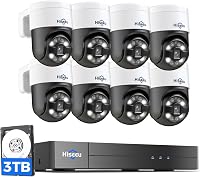
The Hiseeu system comes with eight cameras and a base station with a 1TB hard drive. The base station connects to a TV or display for local viewing, while remote viewing uses Wi-Fi.
A multi-camera kit can cover more areas, but only if you have suitable mounting spots and a workable network plan. For a comparison of power options, read how security cameras are powered.
Does local storage matter for solar cameras?
Local storage helps you keep and review footage without depending on a monthly cloud plan. Systems differ in how storage works: some use a hub, some use a recorder, and some use removable memory cards.
Check what comes with the system and what you need to add. The aosu kit includes 32GB and supports expansion up to 1TB with a separate microSD card.
Reolink's hub supports expandable local storage, but its microSD card is not included. Hiseeu's base station has a 1TB hard drive.
Also check how you can view clips when you're away from home. Solar power helps keep a camera charged; storage controls how footage is saved and reviewed.
How should you set up and care for a solar camera?
Choose the camera view first, then place the panel where it can get useful sunlight. This order helps avoid a camera angle that works poorly just because the panel is easy to mount there.
Before drilling, check the view from the camera position and look for obstructions that could block the area you want to monitor. Then assess the panel's exposure and whether its cable can reach the camera.
Connect any hub or base station as directed, and confirm that live view, alerts, and saved clips work before relying on the system. Set detection zones and alert options to reduce unwanted notifications, and review clips after the first few days to see whether the camera is catching the right activity.
Keep the panel surface clear and inspect its position when seasons change or nearby plants grow. Don't count on solar charging to compensate for a panel that remains shaded or a camera that records far more often than expected.
Which solar camera setup fits your property?
Choose a solar kit when you have useful sunlight, practical camera locations, and a recording style that meets your needs. Skip it when the panel would stay shaded or when you need uninterrupted video from a battery-powered camera.
The aosu kit suits buyers who need several outdoor views and want to position each panel apart from its camera. Its base station includes local storage, with room to expand using a separate memory card.
Choose the Reolink four-camera kit if pan-and-tilt coverage and hub-based storage fit your layout. Skip it if continuous recording is essential, since this camera does not support it.
The Hiseeu system fits a larger property where eight cameras, a base station, and a 1TB hard drive make sense. Its local display option also suits a home or workshop where you want to view footage at the base station.
For more choices, use our solar security camera systems guide. To decide whether solar is right for you, check the sunlight at every panel location, then match the camera's recording and storage to the footage you want to keep.
Frequently asked questions
Do solar security cameras work at night?
Yes. Solar cameras use stored battery power after dark, while night vision helps capture activity in low light.
Charging happens during daylight, so panel exposure and the camera's power use still matter.
Check the model's night vision features and consider how much activity occurs after dark.
Do solar cameras need direct sunlight all day?
No, but the panel needs enough useful sunlight to keep up with the camera's power use. Shade, season, panel angle, and camera settings affect charging.
Choose the brightest practical panel location and follow the model's sunlight guidance.
Can solar security cameras record continuously?
Some battery-powered solar cameras record motion events instead of continuous video to conserve power. If you need round-the-clock recording, confirm that the system supports it before buying.
A wired camera and recorder may fit better when a continuous timeline is essential.
Are solar security cameras good for cloudy areas?
They can work, but frequent cloudy weather may reduce charging and make a solar camera less dependable without another charging option. Mount the panel in the brightest practical spot, check the model's sunlight guidance, and consider wired power if steady recording matters.