Eufy E42 Security Camera Kit Review: Worth It? (November 2026)
The eufy SoloCam E42 4-Cam Kit is the clear pick for outdoor coverage because it combines 4K video, solar charging, AI tracking, strobe deterrence and HomeBase 3 storage. Choose the Indoor Cam E220 for rooms or the C35 for flexible magnetic mounting.
On this page (10 sections)
- Eufy E42 security camera kit review: the quick verdict
- The eufy SoloCam E42 4K Solar 4-Cam Kit at a glance
- Who should choose the E42 kit?
- Which E42 specifications matter in daily use?
- How does E42 setup work?
- What storage and recording choices does the E42 offer?
- How should you care for and use the E42?
- What are the E42 trade-offs?
- Which alternatives fit different homes?
- Is the E42 worth choosing for your home?
The eufy SoloCam E42 4-Cam Kit is the best choice for outdoor security when you want 4K video, solar charging, AI tracking and local storage in one system. This eufy E42 security camera kit review compares its coverage and daily setup with two eufy alternatives that fit different homes.
The E42 is built around four outdoor cameras and a HomeBase 3 hub. It suits a homeowner who wants several viewpoints without monthly storage fees, while the E220 is designed for indoor rooms and the C35 favors easy placement.
Eufy E42 security camera kit review: the quick verdict
The E42 earns its 9/10 score because its feature mix directly matches outdoor monitoring needs. Four 4K cameras, removable solar panels, AI tracking, a strobe light, a siren and HomeBase 3 give it a complete system shape instead of treating each camera as a separate device.
Its strongest use is covering places such as a front porch, driveway, yard and side approach. The system supports smartphone connectivity, Wi-Fi and wireless operation, while HomeBase 3 provides 16 GB of built-in storage and expansion up to 16 TB.
The main trade-off is that the E42 is more involved than an indoor plug-in camera. Screw-in installation, solar positioning and storage choices all matter, and 24/7 recording needs Direct Power Mode with extra equipment.
Pick the E42 when outdoor coverage is the priority. Pick the E220 for indoor rooms, or the C35 when magnetic mounting is more useful than 4K detail.
The eufy SoloCam E42 4K Solar 4-Cam Kit at a glance
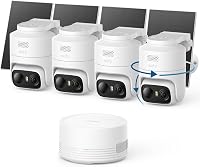
The E42 combines four outdoor SoloCam E42 cameras with HomeBase 3. Each camera has 4K UHD resolution, a removable solar panel and wireless connectivity, while the included hub provides central storage.
eufy SoloCam E42 4K Solar 4-Cam Kit: Best for outdoor coverage

- 4K UHD resolution
- 4 removable solar panels
- HomeBase 3 included
- AI motion tracking
- Up to 16 TB HomeBase storage
A strong outdoor kit for homeowners who want 4K footage, solar charging and local storage across several areas. HomeBase 3 adds central storage and supports recording during network outages.
Pros
- 4K UHD video
- SolarPlus 2.0 charging
- AI person and vehicle tracking
- Motion-activated strobe and siren
- No monthly fee
Cons
- microSD card is separate
- 24/7 recording needs direct power and additional storage setup
- Outdoor installation uses screw-in mounting
The system is designed for several viewing angles around one property. Its wide viewing angle is intended to reduce blind spots, and the camera can recognize license plates up to 33 ft away according to the product information.
AI motion detection tracks people, vehicles and important events within view. A motion-activated strobe light and siren add an active deterrent, while phone notifications alert you to suspicious activity.
The E42 also supports Apple HomeKit, Alexa and Google Assistant. That makes it a better fit for a connected home than a system that only works through one dedicated app.
Who should choose the E42 kit?
The E42 suits homeowners who want outdoor cameras at several points around the property without running video cables between each position. SolarPlus 2.0 is designed to keep the cameras charged with 2 hours of direct sunlight daily.
It is a good match for a front entry, driveway, yard and side path where each camera can face a different approach. The four-camera count also helps when one camera needs to watch a narrow passage rather than a broad main area.
The kit is less suitable for a room-by-room indoor system. The E220 has plug-in power, pan and tilt coverage, human and pet AI and two-way audio, so it is a more natural choice for living rooms, nurseries or hallways.
The E42 also requires more planning than a camera placed beside an outlet. You need suitable screw-in mounting points, solar exposure and a storage plan.
Measure the intended mounting areas before ordering, especially where a wall, roof edge or fence may shade a panel.
For a broader brand comparison, see aosu vs eufy when you are deciding between these two camera ecosystems.
Which E42 specifications matter in daily use?
The most useful E42 specifications are 4K resolution, solar charging, AI tracking and HomeBase 3 storage. Together, they affect what you can see, how often you handle the cameras and how you keep footage.
| Detail | Eufy SoloCam E42 |
|---|---|
| Camera count | 4 |
| Resolution | 4K UHD |
| Power | Battery powered |
| Solar system | Removable solar panels with SolarPlus 2.0 |
| Connection | Wireless Wi-Fi |
| Storage | 16 GB HomeBase 3, expandable up to 16 TB |
| Camera microSD support | Up to 128 GB |
| Installation | Screw in |
| Coverage features | Wide viewing angle, pan and tilt, 360° protection |
| Detection | AI people, vehicle and event detection |
| Deterrence | Motion-activated strobe light and siren |
| Smart assistants | Apple HomeKit, Alexa and Google Assistant |
| Color | White |
The 4K resolution matters most when the camera view includes distant detail. The product information also gives a license-plate recognition distance of up to 33 ft, though the result still depends on placement and the scene in front of the camera.
The storage setup is flexible but not identical in every mode. HomeBase 3 holds 16 GB internally and expands to 16 TB with a hard drive, while a direct router connection uses a microSD card.
How does E42 setup work?
E42 setup starts with placing HomeBase 3, adding the cameras in the eufy app and mounting each camera where sunlight and coverage work together. The included hardware contains four cameras, four removable solar panels, a charging cable, a power adapter and HomeBase 3.
Begin with the hub near the network connection and a suitable power outlet. Add the cameras through the app before final mounting so you can check each camera's view and connection from the intended area.
The screw-in installation calls for a firm mounting surface. Aim each camera at the area you need to watch, then consider the path of the sun before fixing the solar panel position.
The solar panel should receive direct sunlight, since the stated SolarPlus 2.0 guidance is based on 2 hours of direct sunlight each day. A shaded camera can still be mounted in the right place for security, but its charging position needs separate attention.
HomeBase 3 and the app also need current software when used with an existing HomeBase 3. The product information gives firmware V3.6.9.0 or later and app V5.0.80 or later for that situation.
What storage and recording choices does the E42 offer?
The E42 offers local storage without a monthly fee, with three practical storage paths. You can use HomeBase 3's internal 16 GB, expand the hub up to 16 TB with a hard drive or use a microSD card when connecting through a router.
The storage choice depends on how you want the system arranged. HomeBase 3 keeps footage central and supports continuous recording during network outages, while a direct router setup needs a microSD card.
The cameras support up to 128 GB of microSD storage. A card is not included, so include that separate storage decision when planning the system.
24/7 recording has a specific power requirement. Direct Power Mode needs a 5V/2A adapter and compatible cable sold separately, and continuous recording through HomeBase 3 requires a hard drive installed in the hub.
For event-based security, AI detection and phone notifications reduce the need to review every minute of footage. People, vehicles and important events can be treated as different reasons to receive an alert.
How should you care for and use the E42?
The E42 is easiest to manage when the camera views, solar panels and storage are checked as one system. Clear views help the AI features, while clean panels support the charging setup.
Inspect each camera's view after mounting. Trees, walls and bright background light can change what appears in the frame, so a camera aimed at a driveway may need a different angle from one watching a shaded side path.
Keep the solar panel surface clear of dirt and leaves. The stated charging performance depends on direct sunlight, so a panel that becomes shaded or covered will not receive the same light as an exposed panel.
Review notifications after the first setup period. AI detection is useful only when the alert areas match the property, so adjust the camera direction and detection choices if ordinary movement creates too many alerts.
For footage management, decide how long you need recordings kept and whether the hub or camera storage better fits that routine. Local storage keeps the system independent of a monthly cloud plan, but it still needs available capacity.
What are the E42 trade-offs?
The E42's biggest trade-off is planning complexity in exchange for broad outdoor coverage. You receive four cameras, solar panels and HomeBase 3, but each viewpoint needs a mounting position, a useful angle and enough sunlight for its panel.
The system's 4K resolution is a clear advantage for distant detail. It also raises the importance of camera placement, because resolution cannot correct a view blocked by a wall, glare or poor positioning.
The E42 supports microSD storage and HomeBase 3 expansion, but the most flexible recording modes use different hardware. Event recording is simpler, while 24/7 recording needs direct power or a hard drive arrangement.
The white finish is practical for a visible outdoor system, but it may stand out against some walls or trim. That is a placement preference rather than a performance issue.
The kit also focuses on outdoor monitoring rather than indoor conversation. It has strobe and siren deterrence, while the E220 adds built-in two-way audio for speaking to someone inside a room.
Which alternatives fit different homes?
The E42 is the strongest outdoor pick here, but the two alternatives fit different daily needs. The E220 is better for indoor rooms, while the C35 is the better choice when mounting flexibility and color night vision come first.
Eufy Security Indoor Cam E220 2-Cam Kit
The E220 is the indoor-room alternative for homeowners who need plug-in cameras with pan and tilt coverage.
eufy Security Indoor Cam E220 2-Cam Kit: Best for indoor rooms
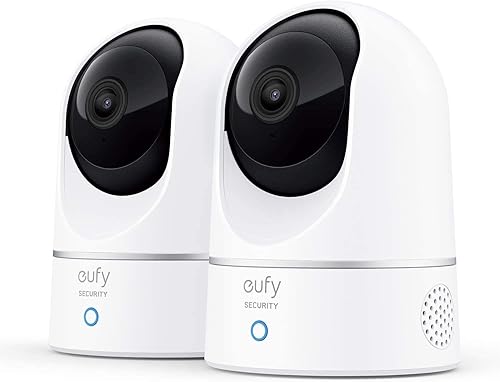
- 2K clarity
- 360-degree coverage
- Human and pet AI
- Automatic motion tracking
- Two-way audio
This two-camera indoor kit is suited to rooms where plug-in power, pan and tilt coverage, human and pet detection and two-way audio matter more than outdoor weather coverage.
Pros
- 2K video
- 360-degree field of view
- Human and pet AI
- HomeKit, Google Assistant and Alexa support
- Built-in two-way audio
Cons
- Indoor use
- Plug-in installation
- HomeKit use lowers video resolution to 1080P
Its on-device AI identifies human or pet activity and records events of interest. Each camera provides up to 2K clarity, automatic motion tracking and a 360-degree field of view, making the two-camera kit useful for rooms where a fixed view would leave corners uncovered.
The built-in two-way audio gives the E220 a role the E42 does not emphasize. You can use it to communicate with someone who passes the camera, while HomeKit, Google Assistant and Alexa support fit a connected home.
HomeKit use changes the stated resolution to 1080P. That makes the E220 a strong indoor choice, but not the best substitute when your main goal is 4K outdoor detail.
EufyCam C35 4-Cam Kit
The C35 is the flexible-mounting alternative for indoor or outdoor placement.
eufyCam C35 4-Cam Kit: Best for flexible mounting

- 4 wireless cameras
- Magnetic and screw-free mounting
- Color night vision
- HomeBase Mini included
- Local storage
The C35 suits homes that need four cameras with magnetic, flat-surface or screw mounting. It supports indoor and outdoor placement, local storage and color night vision without a monthly fee.
Pros
- Magnetic mounting
- Color night vision
- Indoor and outdoor use
- HomeBase Mini AI features
- No monthly fee
Cons
- HomeBase Mini is not compatible with HomeBase 2
- Lower stated resolution than the E42
- MicroSD cards are separate
Its magnetic base can snap onto a metal surface, and the cameras can also sit on a flat surface or use screw mounting. That gives the C35 more placement options when drilling is difficult or a camera needs to move between positions.
Color night vision works without a spotlight, and HomeBase Mini adds facial recognition and cross-camera tracking features. Local storage reaches up to 1 TB on HomeBase Mini, while the cameras support separate microSD cards up to 256 GB.
The C35 uses a 2.4 GHz Wi-Fi connection and works with Alexa, Google Assistant and smartphones. It is not compatible with HomeBase 2, so it fits best when you are starting a HomeBase Mini system rather than extending a HomeBase 2 setup.
For another camera review in the same brand family, read this eufy C37 review. If you are comparing wired systems instead, ZOSI vs ANNKE covers a different installation path.
Is the E42 worth choosing for your home?
The E42 is worth choosing when you need four outdoor viewpoints with 4K video, solar charging and local storage. Its score of 9 reflects that complete match for outdoor coverage, especially when HomeBase 3's storage expansion and network-outage recording matter.
Choose the E220 instead for indoor rooms, plug-in power, two-way audio and human or pet detection. Its 9.7 score reflects a stronger fit for indoor monitoring, not better outdoor protection.
Choose the C35 when magnetic mounting, color night vision and flexible indoor or outdoor placement matter most. Its 8.2 score reflects the trade-off between its convenient mounting and the E42's higher stated resolution and larger storage potential.
The final decision rule is simple: pick the E42 for outdoor coverage across several property areas. Pick the E220 for indoor rooms, and choose the C35 when installation flexibility is the feature that will determine whether you use every camera.
For a different brand comparison before you decide, see ZOSI vs ANNKE wired camera kits compared. This eufy e42 security camera kit review points to the E42 as the right buy for a solar-powered outdoor system with four cameras and local storage.
Frequently asked questions
Does the eufy SoloCam E42 support continuous recording?
The SoloCam E42 supports 24/7 recording in Direct Power Mode with a 5V/2A adapter and compatible cable sold separately. With a router, it requires a microSD card, while HomeBase 3 needs a hard drive installed for continuous recording.
How much storage does the E42 kit have?
HomeBase 3 includes 16 GB of built-in storage and supports expansion up to 16 TB with a hard drive. Each camera also supports up to 128 GB of microSD storage, but the card is separate.
Can the E42 connect to HomeBase 3?
Yes. The SoloCam E42 supports HomeBase 3, HomeBase 2 and direct router connection.
HomeBase 3 is included with this four-camera kit and also supports recording during network outages.
Is the eufyCam C35 a good E42 alternative?
The C35 is the better alternative when flexible mounting and color night vision matter more than the E42's 4K resolution and larger HomeBase storage potential. It uses HomeBase Mini, supports local storage and works indoors or outdoors.