Do All Eufy Cameras Work Together?
No, not all eufy cameras work together. Compatibility depends on the camera model, HomeBase version, connection method, and the features you want to use.
On this page (10 sections)
- Do all eufy cameras use the same HomeBase?
- Which eufy cameras can share a system?
- Can SoloCam E42 and other eufy cameras work together?
- Can indoor and outdoor eufy cameras work together?
- What does the eufy App let different cameras do?
- Which eufy cameras share storage?
- How should you mix eufy cameras for a whole home?
- What should you check before adding a camera?
- So, do all eufy cameras work together?
- For a different brand comparison, read our guide to eufy vs Blink. If you are focused on one eufy kit, the eufy C37 review is the next useful comparison.
No, do all eufy cameras work together? Not automatically.
Some cameras share a HomeBase, some connect directly through Wi-Fi, and some work together in the eufy App without sharing every storage or recording feature.
The safest way to plan a mixed system is to compare the camera model with the HomeBase it supports. The eufyCam C35 uses HomeBase Mini, SoloCam E42 supports HomeBase 2 and HomeBase 3, and Indoor Cam E220 is compatible with HomeBase 3.
Do all eufy cameras use the same HomeBase?
No, eufy cameras use different HomeBase families and connection methods. A camera can appear in the same app as another model while still needing a different base or operating independently.
The eufyCam C35 is built around HomeBase Mini. The camera is not compatible with HomeBase 2, so an existing HomeBase 2 setup does not automatically make the C35 part of that system.
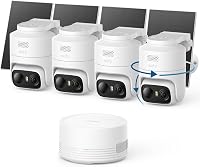
SoloCam E42 has broader base support. It works with HomeBase 2 and HomeBase 3, and the 4-camera kit includes HomeBase 3.
E42 can also connect to a router, which gives you another setup path.
Indoor Cam E220 is compatible with HomeBase 3. Its product information also names Apple HomeKit, Google Assistant, and Amazon Alexa as compatible platforms, so its smart-home role differs from a battery-powered outdoor camera.
This is why model names matter more than the eufy brand name alone. Before combining cameras, identify the exact model and the HomeBase generation that supports it.
Which eufy cameras can share a system?
Cameras can share a system when their supported base, app, and storage features line up. The strongest match in this group is SoloCam E42 with HomeBase 3 because the camera and base are supplied as one system.
The eufyCam C35 setup
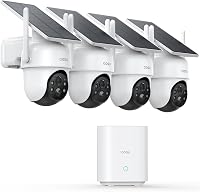
The eufyCam C35 includes 4 cameras and HomeBase Mini. Its cameras use 2.4 GHz Wi-Fi and support indoor or outdoor placement, with a magnetic base that can attach to metal or sit on a flat surface.
HomeBase Mini supports advanced AI features such as facial recognition and cross-camera tracking for supported devices. The C35 also supports local storage through HomeBase Mini or a separate microSD card in the camera.
The main compatibility rule is simple: C35 belongs with HomeBase Mini, not HomeBase 2. That single detail can decide whether it fits an existing eufy setup.
Can SoloCam E42 and other eufy cameras work together?
Yes, SoloCam E42 can work with HomeBase 3 and can sit alongside compatible eufy cameras in the eufy App. Its support for HomeBase 2 and HomeBase 3 gives it more flexibility than the C35 in this comparison.
The SoloCam E42 setup
SoloCam E42 is an outdoor camera with 4K UHD video, AI motion detection, automatic tracking, a strobe light, and a siren. Its SolarPlus 2.0 system is designed to keep the camera charged with 2 hours of direct sunlight each day.
The kit includes 4 removable solar panels and HomeBase 3. HomeBase 3 has 16 GB of built-in storage and supports expansion up to 16 TB with a hard drive installed.
E42 also supports continuous recording in Direct Power Mode with a 5V/2A adapter and compatible cable. When connected to a router, it requires a microSD card for that recording mode.
Can indoor and outdoor eufy cameras work together?
Yes, indoor and outdoor cameras can be managed within a broader eufy setup when their connection and base requirements match. They still serve different jobs, so shared app access does not mean identical recording modes or hardware.
The Indoor Cam E220 setup
Indoor Cam E220 is a plug-in indoor camera with pan-and-tilt movement and 360-degree coverage. Its on-device AI identifies human or pet activity and records relevant events.
The camera supports 2K video, or 1080P while using HomeKit. It also provides two-way audio and can automatically track a moving object after motion detection.
E220 works with HomeBase 3, while its smart-home support includes Apple HomeKit, Google Assistant, and Amazon Alexa. That makes it useful for rooms, pets, and indoor activity, while E42 is aimed at outdoor coverage and C35 supports both indoor and outdoor placement.
What does the eufy App let different cameras do?
The eufy App gives you one place to add and manage compatible cameras, but the app does not erase hardware limits. Each model keeps its own supported base, power method, storage path, and camera features.
A mixed system might show indoor and outdoor cameras together in the app. You can use that arrangement to view different areas from one phone, but storage still depends on the camera and HomeBase combination.
For example, C35 footage can use HomeBase Mini or a camera microSD card. E42 can use HomeBase 3, a router connection, or a camera microSD card depending on the recording mode.
E220 is a plug-in indoor model with HomeBase 3 compatibility and smart assistant support.
The app also needs to be current for supported devices. The C35 product data specifies eufy App version 5.2.10_16477001 for iOS or 5.2.10_17014 for Android, or newer.
If you are comparing ecosystems before choosing a kit, our aosu vs eufy comparison covers the larger brand decision.
Which eufy cameras share storage?
Storage is shared only when the cameras and base support the same storage system. A camera's ability to use local storage does not mean every camera in the home writes to the same device.
HomeBase Mini stores C35 footage centrally and supports expansion up to 1 TB. The C35 camera also supports a separate microSD card slot for direct local recording up to 256 GB, with at least 32 GB recommended.
HomeBase 3 gives E42 a different storage path. It has 16 GB built in and supports expansion up to 16 TB with a hard drive.
E42 also supports up to 128 GB of microSD storage when connected through a router.
For 24/7 recording, E42 uses Direct Power Mode with a 5V/2A adapter and compatible cable. With HomeBase 3, a hard drive must be installed for that recording mode.
The practical rule is to choose the storage base before adding cameras. A shared app view is convenient, but a shared storage plan requires matching hardware.
How should you mix eufy cameras for a whole home?
Start with the areas you need to cover, then match each area to the camera's power and connection design. Use indoor plug-in cameras for rooms, solar outdoor cameras for open areas, and a HomeBase-supported kit when central storage matters.
A simple mixed plan could use Indoor Cam E220 for rooms and SoloCam E42 for the yard or driveway. Both fit a HomeBase 3-centered setup, although they have different power and recording features.
The eufyCam C35 suits a home that wants indoor and outdoor cameras with HomeBase Mini. Its magnetic mounting gives you more placement choices, while its 2.4 GHz Wi-Fi connection keeps the network requirement straightforward.
Do not choose a camera only because its name includes eufyCam or SoloCam. The C35 and E42 have different base rules, and E220 has a different indoor design.
The exact model determines how the system fits together.
What should you check before adding a camera?
Check the HomeBase requirement, power method, storage path, and location before adding a camera. Those four points reveal most compatibility problems without relying on the product family name.
First, identify the base. C35 uses HomeBase Mini, E42 supports HomeBase 2 and HomeBase 3, and E220 is compatible with HomeBase 3.
Next, match the power design to the location. E42 uses removable solar panels and battery power outdoors, C35 supports flexible placement indoors or outdoors, and E220 plugs in for indoor use.
Then choose storage. C35 supports HomeBase Mini storage or a camera microSD card, while E42 offers HomeBase 3 storage and other local recording paths.
E220 focuses on event recording and indoor smart-home integration.
Finally, compare the features you actually need. E42 adds 4K video, pan and tilt, tracking, a strobe, and a siren.
E220 adds 360-degree indoor coverage and two-way audio. C35 adds color night vision, facial recognition, and cross-camera tracking through HomeBase Mini.
So, do all eufy cameras work together?
Do all eufy cameras work together? No.
Pick cameras by their exact HomeBase support and storage method, then build around the base that matches the most important locations.
Choose SoloCam E42 for the strongest HomeBase 3-centered outdoor setup in this group. Choose Indoor Cam E220 for plug-in indoor coverage with pan and tilt.
Choose eufyCam C35 when HomeBase Mini and flexible indoor or outdoor placement fit your plan.
For a different brand comparison, read our guide to eufy vs Blink. If you are focused on one eufy kit, the eufy C37 review is the next useful comparison.
Frequently asked questions
Can eufy cameras from different kits use the same app?
Yes, compatible eufy cameras can be managed through the eufy App, but app access does not make every model compatible with every HomeBase or shared feature. The camera's model and supported base determine how far the setup can work together.
Does eufyCam C35 work with HomeBase 2?
No. The eufyCam C35 is not compatible with HomeBase 2 and uses HomeBase Mini for its connected system.
Its setup also requires a current eufy App and the original 5V/2A power adapter for HomeBase Mini.
Can SoloCam E42 connect to HomeBase 3?
Yes, SoloCam E42 supports HomeBase 3 and comes with one. HomeBase 3 includes 16 GB of built-in storage and supports expansion up to 16 TB when the required hard drive is installed.
Can Indoor Cam E220 be used with HomeKit?
Yes, Indoor Cam E220 supports Apple HomeKit, Google Assistant, and Amazon Alexa. Its resolution is up to 2K, or 1080P while using HomeKit, and it records relevant events using on-device human and pet detection.